The Palatial Agent
The Agent is the chat panel on the left of every asset.
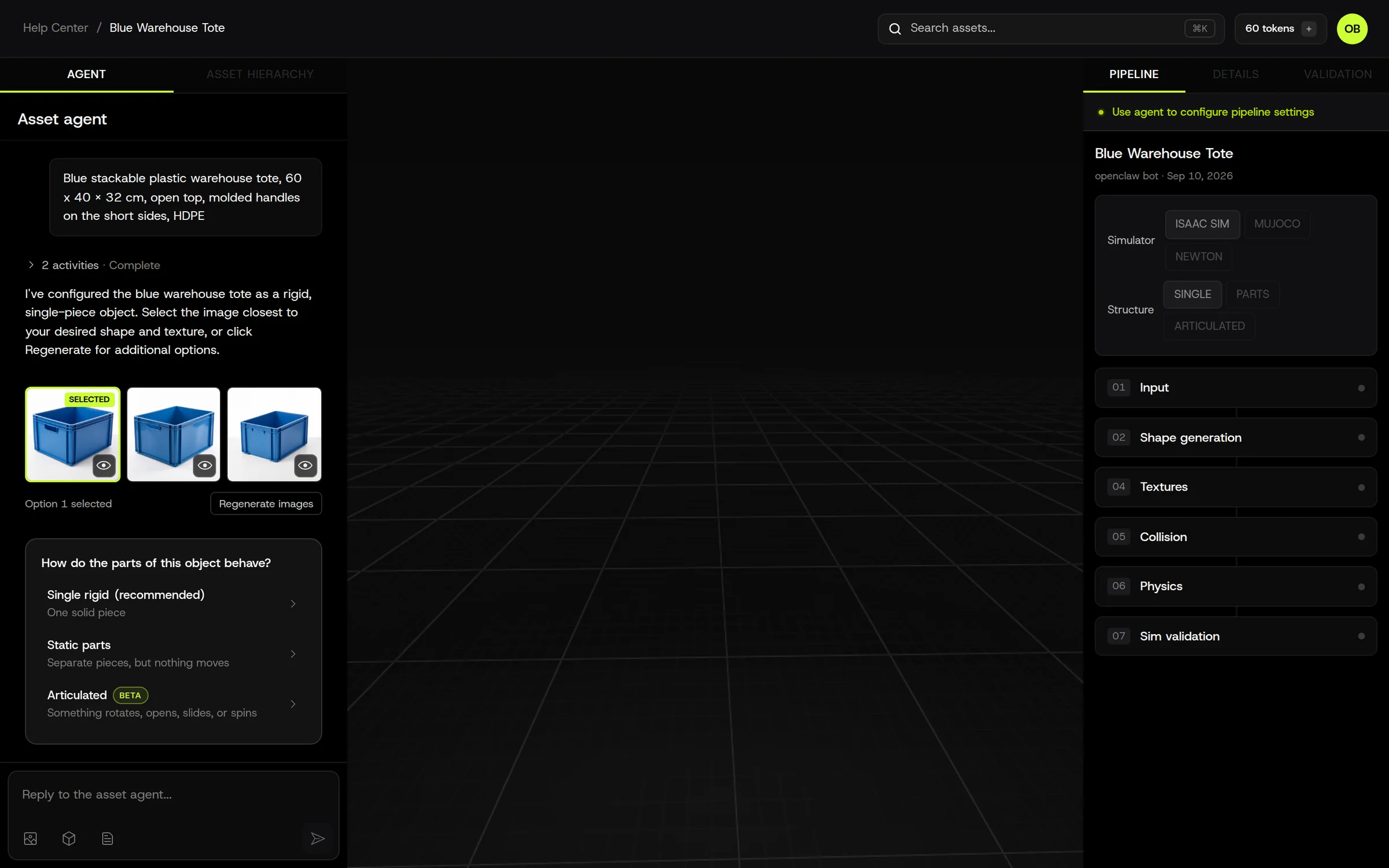
It is how you configure a build without learning forty settings: you describe what you want, it reads your inputs, proposes a configuration, asks you only the questions that change the outcome, and shows you a confirmation card before anything is generated or charged.
What it does for you
Section titled “What it does for you”-
Understands your input. It looks at your photo, CAD preview, or prompt and works out what the object is, roughly how big it is, what it’s made of, and whether it has moving parts.
-
Configures the build. Behavior, target simulator, shape model, physics type, texture settings, collision level. You can see and change every one of these in the Pipeline panel; the Agent’s job is to set sensible defaults so you don’t have to.
-
Asks the right question. When the answer genuinely changes the build, it asks. One question per turn, with clickable options. Examples:
- Single rigid object, separate parts, or articulated parts? (the structure question)
- Which simulator will this run in?
- Which of these is the object? (several things in one photo)
- How does it rest? (upright / on its side / hanging)
- Use your photo as-is, or generate a cleaner reference from it? (object is small in frame)
-
Researches when it helps. For a named product (“Fanuc M-20iD arm”), it can run Product Research: find spec sheets, dimensions, and photos, and show you the evidence before building. You can request changes to the research and it re-audits without losing what it found.
-
Names and describes the asset in English for consistent filenames and part names.
-
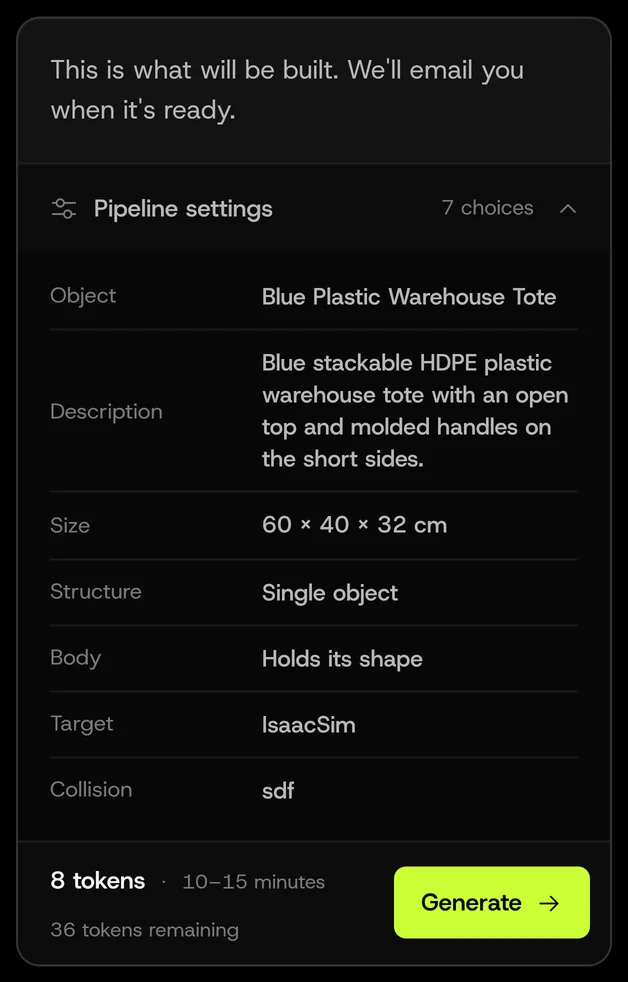
Shows a confirmation card with the understood object, the settings, the estimated time, and the token quote. Nothing runs until you click Generate.
-
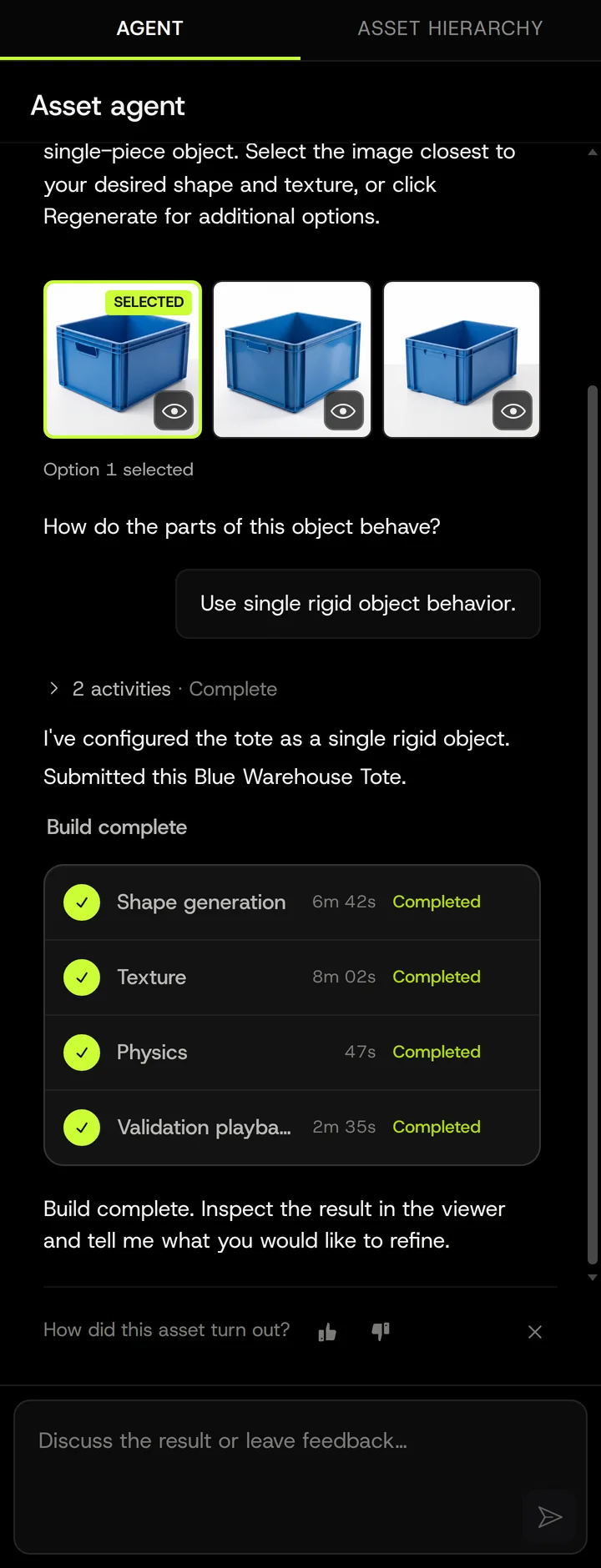
Reports progress and failures honestly. Stage progress and timings appear in the chat and in the Pipeline tab. If something fails, the Agent says which stage and why, and offers a retry when a retry makes sense.
-
Edits after generation. “Make the lid glass”, “it’s 40 cm not 4 m”, “split the handle off”: the Agent applies the change and reruns only the affected stages.
What it will not do
Section titled “What it will not do”- Spend tokens without confirmation. Generation, regeneration, variants, and research all go through a card you click.
- Guess a size it can’t see. If nothing in your inputs says how big the object is, it asks rather than inventing.
- Answer a question with prose while chips are open. If it asked you something with options, it waits for the answer.
- Show you its internal reasoning. You see decisions and results, not the chain of thought.
- Build things the pipeline can’t. Liquids, smoke, characters, full scenes from a single object prompt. It says so up front instead of running and failing.
- Talk to Guests. The conversation is part of the asset; workspace Members can read and continue it, Guests cannot open it.
How a conversation flows
Section titled “How a conversation flows”- You provide input (text, photo, CAD).
- Agent reads it and either proposes a configuration or asks one question.
- You answer by clicking a chip or typing. Typing an answer to a chip question works too.
- Confirmation card. Review, adjust in chat or in the Pipeline panel, click Generate.
- Build runs. Progress in chat and in the Pipeline panel. You can keep chatting (for example, to queue an edit for after the build), but you can’t change settings for the running build.
- Result. READY, or a failure with the stage named and a retry offer.
- Edits. Ask for changes; only affected stages rerun and you get a fresh quote when tokens are involved.
Vocabulary the Agent uses
Section titled “Vocabulary the Agent uses”| Word | Means |
|---|---|
| Reference | The image the mesh is reconstructed from. Your photo, a generated image, or a cleaned-up version of your photo. |
| Identity | The image that defines what the object is. Your original photo stays the identity until you pick a generated option. |
| Structure / Behavior | Single object, Parts, or Articulated. Controls segmentation and joints. |
| Build | One run of the pipeline for this asset. |
| Regenerate | Rerun from shape generation with new settings or a new reference. |
| Retry | Rerun a failed stage with the same inputs. |
| Reprocess | Rerun downstream stages (physics, collision, validation) on existing geometry. |
| Variant | A sibling asset from the same prompt with a different generated reference. |
| Research | Product Research: evidence gathering for a named product before building. |
Where it lives
Section titled “Where it lives”The Agent runs against your asset’s conversation, which persists with the asset. Refreshing the page restores the chat, including build progress. Workspace Members can read and continue the conversation; Guests cannot open it.