How tokens are consumed
Tokens are the unit of usage. Your organization has one shared balance; every workspace in the organization draws from it. Generation is admitted against a route minimum, then each successfully completed stage settles its own charge. The whole generation estimate is never deducted up front.
What consumes tokens
Section titled “What consumes tokens”| Action | Consumes tokens | Notes |
|---|---|---|
| Generating an asset (text, image, or CAD) | Yes | Each successfully completed stage is charged after it finishes. CAD input skips shape generation, so its stage list is shorter. |
| Each additional variant | Yes when stages complete | A new Variant needs the start minimum of the route it runs on. Its completed stages are charged independently. |
| Regenerate / Reprocess in place | Yes when a stage completes | An in-place retry or reprocess generally requires a positive balance, then charges only the stages that complete. A replay of an already-settled stage does not duplicate that charge. |
| Retry after a failed or cancelled build | Yes when stages complete | A retry is a new run. Failed or skipped stages are not charged; completed stages from the retry settle normally. |
| Articulated behavior, Parts segmentation, higher Collision levels, Sim validation | Yes when the stage completes | Each applicable stage has its own receipt. A skipped or fixed-price-zero stage is not charged. |
What is free
Section titled “What is free”- Everything in the viewer: inspecting, changing views, hiding parts.
- Stages skipped because they do not apply to the route or asset.
- Exporting and downloading the package. Exports are free; tokens are charged on generation only.
- Cancelling a build. Stages that did not complete are not charged.
- Talking to the Agent, asking questions, and changing settings before you submit.
- Publishing to and importing from the Organization Library (imports count toward your plan’s active-asset limit, not tokens).
- Reading, listing, and status-polling through the API.
How stage charges work
Section titled “How stage charges work”Each route has a minimum balance to start: Diffusion 20 tokens, Parametric Low 40, Mad Max 80, and CAD → Sim 4. This is an admission floor, not a quote and not a reservation. After admission, an already-running stage is allowed to finish and its charge is recorded. If that charge leaves the shared balance at zero or below, the next stage waits.
The viewer shows a charged X tokens receipt after each completed stage. API clients should read billing.stages[].tokenCost; do not multiply a total by the number of stages. For Mad Max, the 80-token start minimum is only an admission requirement, not a quote or a confirmed total. The final charge is the sum of the stages that actually complete. Eligible edit stages use the 50% rate; positive discounted amounts are rounded down and remain at least 1 token. A zero actual-cost delta falls back to the fixed stage price; when that fixed price is also zero the receipt says No charge.
Where tokens live
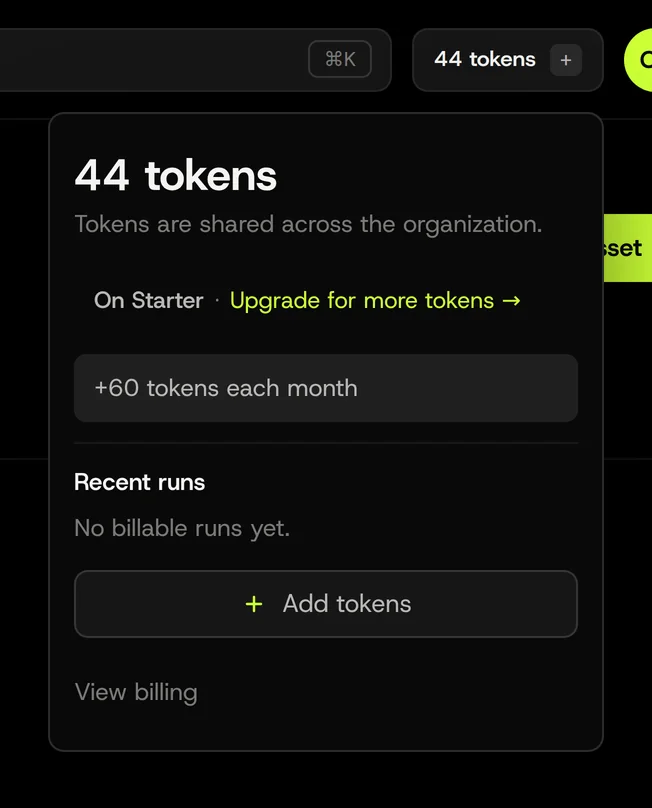
Section titled “Where tokens live”Tokens belong to the organization and are shared across all of its workspaces. The token pill in the workspace header shows the organization balance and opens a popover with your plan, the next monthly grant date (if any), and recent token-metered runs.
The balance has two buckets: plan tokens (your plan’s monthly grant) and purchased tokens (bought as needed). Plan tokens are used first. On the free plan, the monthly grant applies to the first free organization you own and refills roughly every 30 days.
Running out
Section titled “Running out”When a new request does not meet its route minimum, generation is rejected before the run is created. During a run, the active stage can finish even when the balance reaches zero or below; the next stage pauses. A normal between-stage checkpoint resumes automatically about once a minute while the balance is above zero. A credit pause (billing.paused: true, pauseReason: insufficient_credits) resumes on the same asset after a posted top-up makes the net balance positive. Palatial sends a billing-hold email to the organization owner when the shared balance pauses generation. Anyone with edit rights in the workspace can add tokens; plan changes are handled by organization admins.
From the API
Section titled “From the API”Generation requests are checked against the route minimum before uploads start and return an insufficient_tokens error (HTTP 403) with tokens.required, tokens.balance, and tokens.shortfall if the request is rejected; nothing is created. Status polling, listing, reads, and export downloads are free. Using the API.
Related: Variants, Editing, Roles and permissions.