Using the API
Use the Palatial API to create SimReady 3D assets from text, photos, video, or CAD files, branch and regenerate them, track progress, and download the results programmatically. All routes below use your API key and live under:
https://dashboard.palatial.cloud/api/v1/external/The Experimental unified Agent entry is available at the production base above with a workspace API key. Compatibility endpoints remain available.
Creating an API key
Section titled “Creating an API key”API keys are created per workspace. Workspace asset operations are scoped to the workspace the key was created in, and only workspace members (or organization admins) can create one. The upcoming Library API also accepts published public Library sources from other workspaces. See Roles and permissions.
-
Open the workspace in the dashboard and select the API tab next to Assets, Exports, and Team.
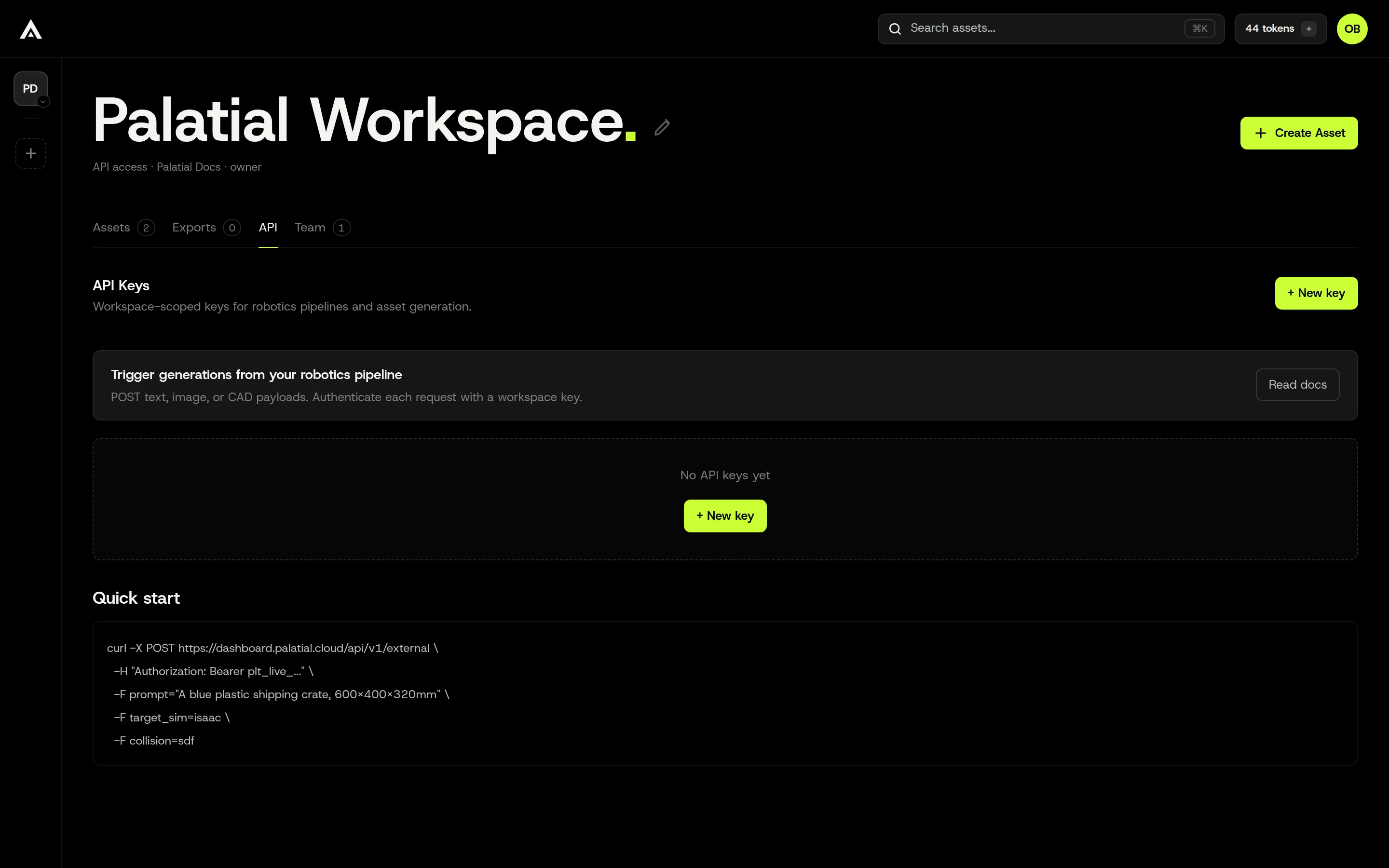
-
Click New key. Give the key a name so you can recognise it later (for example the pipeline or machine that will use it). The expiration date is optional. The rate-limit fields in this dialog are optional and are not currently applied to API requests.
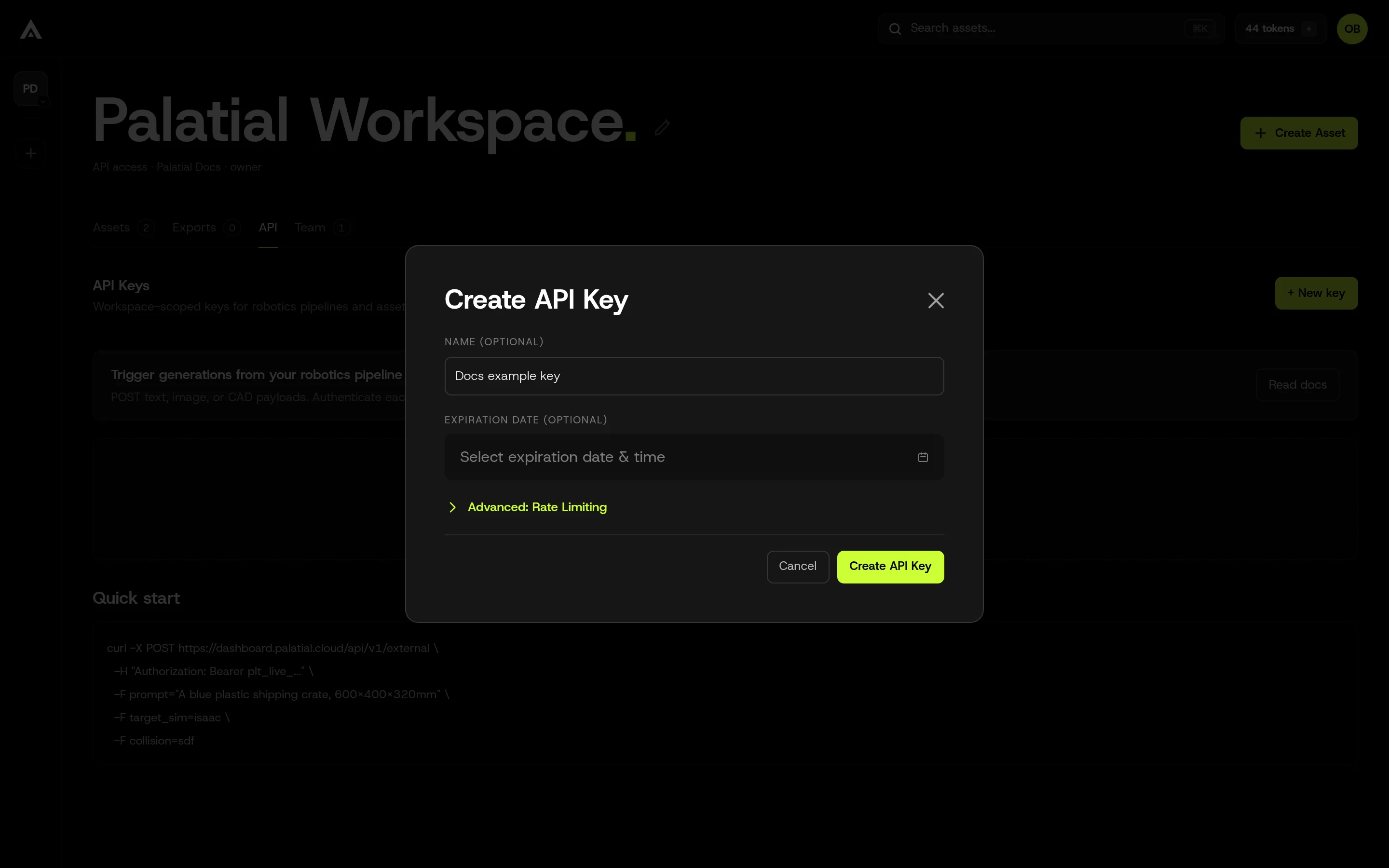
-
Click Create API Key. The key is shown once. Copy it and store it in your secret manager now; after you close this dialog it cannot be displayed again.
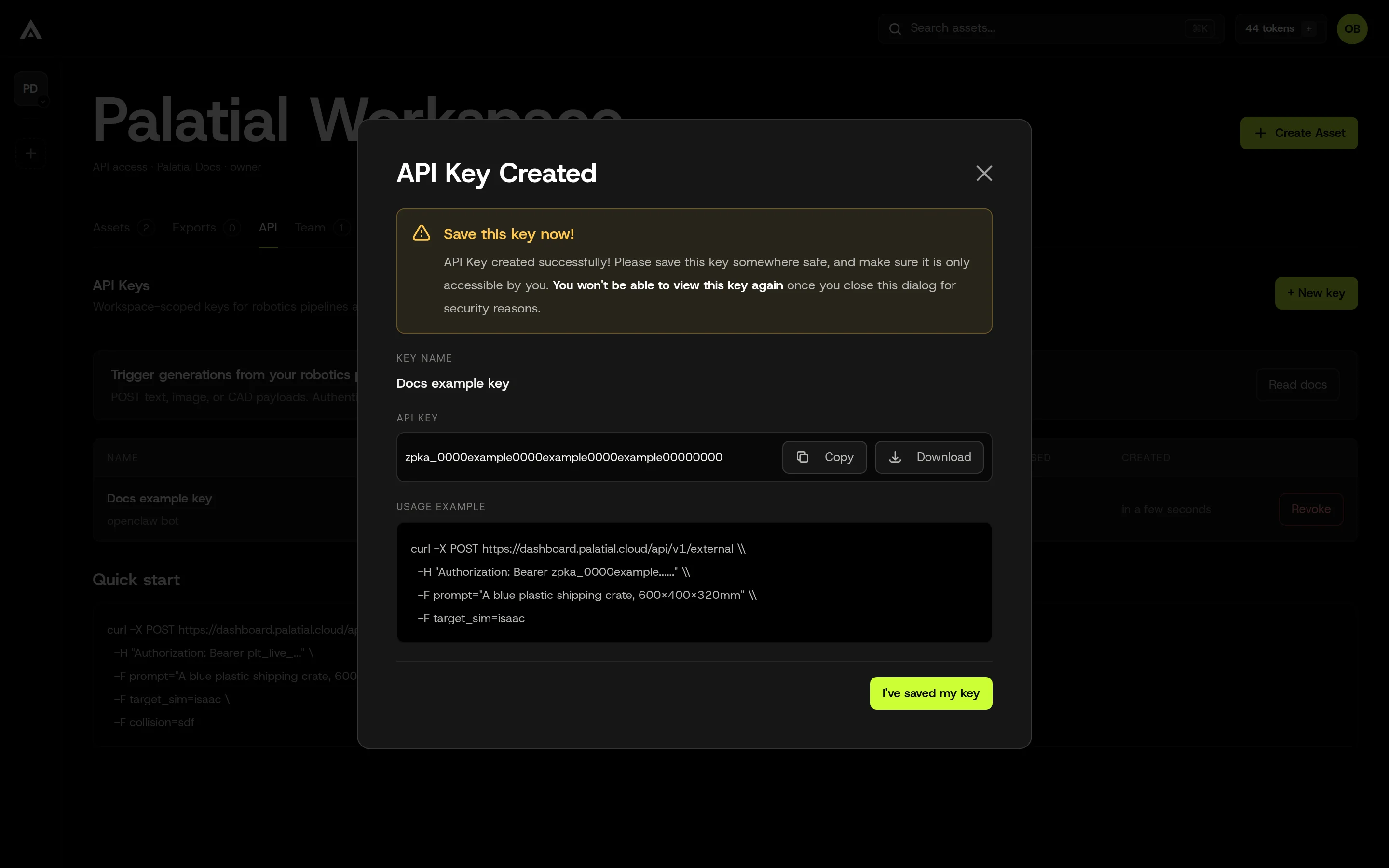
-
Click I’ve saved my key. The key now appears in the list with a masked value, its scope, and when it was last used. Revoke removes it immediately; requests using a revoked key return 403.
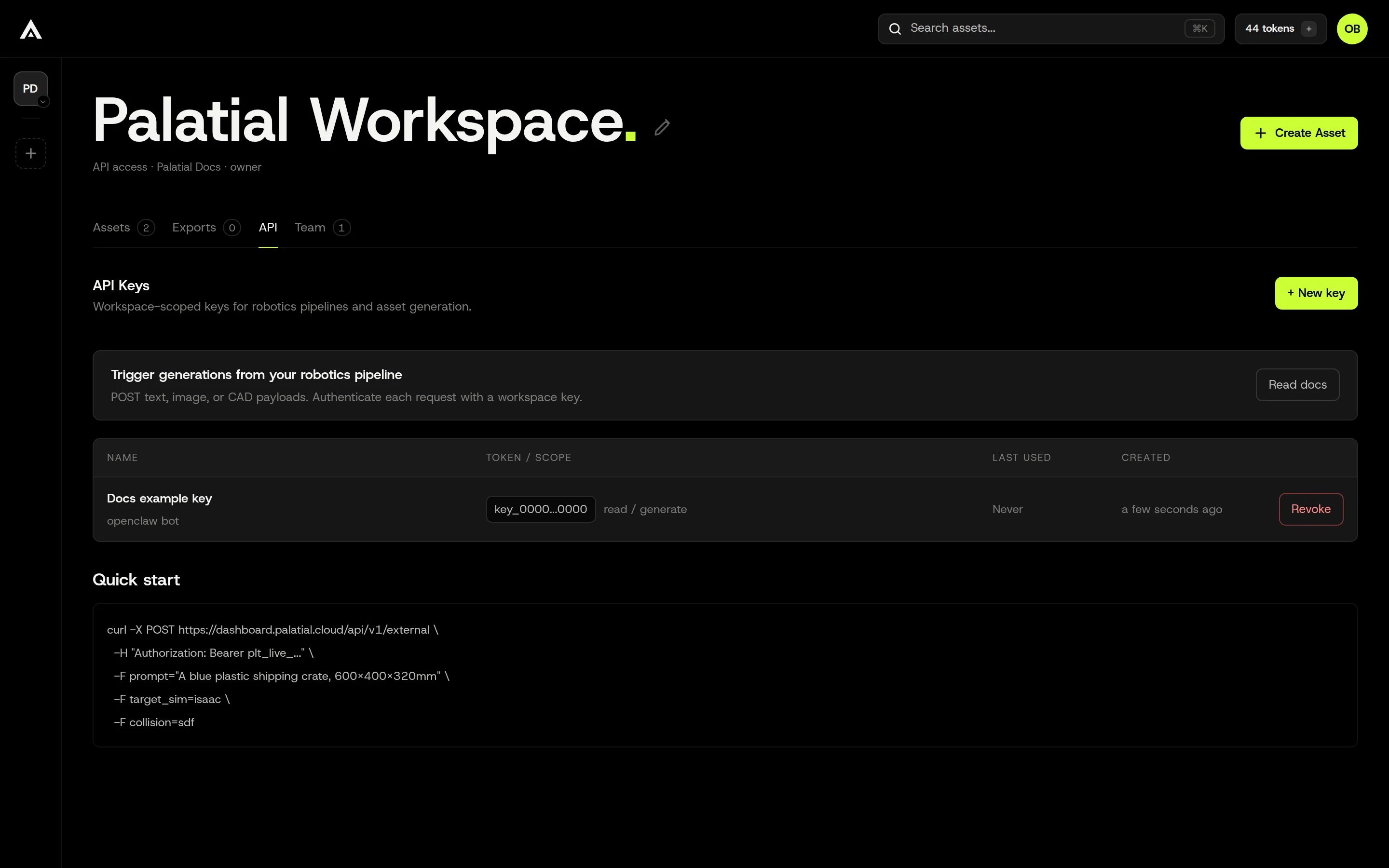
Never paste a key into a chat message, screenshot, public issue, or source file. If a key may have been exposed, revoke it from the API tab and create a new one.
Typical flow
Section titled “Typical flow”- Send asset intent to the native Agent. The Agent understands text and supplied image/CAD/video evidence together with saved project data, chooses supported capabilities, and executes unattended.
- Poll the same request ID. Preserve the project across native billing pauses and report genuine structured blockers.
- Check authoritative asset/media/validation state and use structured download links. Accepted work is not finished generation.
- Continue by describing the requested change with the same project identity. The MCP exposes this complete workflow through the single
palatial_agenttool.
The lower-level image, text, CAD, batch, research-job and Variant endpoints below remain compatibility interfaces. Their existing interaction contracts do not apply to the unattended Agent entry.
Authentication & access
Section titled “Authentication & access”Send the key on every request in one of these headers:
x-api-key: YOUR_API_KEYAuthorization: Bearer YOUR_API_KEY
When both are present, Authorization wins. Query-string keys are not supported.
A key is bound to its user and workspace. Every request is also checked against the key’s capabilities and the user’s workspace membership:
- Reads (asset, status, downloads, workspace) need workspace membership.
- Writes (create, submit, reprocess, Variant, cancel, export) need edit access to the workspace.
- Variants need the
asset:variant-createcapability. Keys created before Variants were released do not have it; create a new key to use the Variant endpoint. - Ordinary workspace asset operations stay scoped to the key’s workspace. Sending another destination workspace ID does not grant access.
Authentication and access failures return 403:
| Message | Meaning |
|---|---|
Api key is required |
No key header was sent. |
Invalid api key |
The key is unknown, revoked, or expired. |
API key action denied |
The key lacks the capability for this route. |
Workspace scope denied, Asset scope denied |
The workspace or asset is outside the key’s workspace. An asset ID that does not exist also returns Asset scope denied, not 404. |
HTTP status codes
Section titled “HTTP status codes”| Code | Meaning |
|---|---|
| 200 | Success |
| 201 | Created or accepted. Most POST routes return 201, including submit, reprocess, Variant, and batch status reads. |
| 202 | Accepted for asynchronous work (Agent message, Mad Max job create and answer) |
| 307 | Redirect to a download (export ZIP); follow it with curl -L |
| 400 | Invalid request. Unknown fields are refused with property … should not exist. |
| 403 | Invalid key, missing permission or capability, or a balance requirement is not met |
| 404 | Asset or job not found, or expected media artifact missing; inspect code |
| 409 | The request conflicts with the current state (for example a build is still running) |
| 413 | An upload exceeds its size limit |
| 422 | The requested media representation is not produced (MEDIA_NOT_SUPPORTED) |
| 429 | Too many Mad Max job requests, or too many research builds at once. Wait and retry; see rate limits. |
| 500 | Server error. Retry read-only polling with backoff. Do not replay a create, Variant, reprocess, or export whose outcome is unknown. |
| 503 | Temporarily unavailable, or the feature is not enabled for this environment. A 503 from a create or Variant request created and charged nothing. Retry reads; do not blindly replay a submission. |
Error body
Section titled “Error body”Every error has the same envelope:
{ "statusCode": 409, "code": "VARIANT_SOURCE_NOT_SUCCESSFUL", "message": "A failed or canceled build can only be retried in place.", "correlationId": "…", "timestamp": "2026-10-08T12:00:00.000Z", "path": "/api/v1/external/assets/ASSET_ID/variants"}- Branch on
code. When the server gives no specific code,codeis the status name, such asBAD_REQUESTorFORBIDDEN. messageis human-readable and may change. Validation messages for several fields are joined with;.- Quote
correlationId(also sent as theX-Request-Idresponse header) when you contact support. - Balance errors add
tokensandadmission; see Balance errors.
Asset lifecycle
Section titled “Asset lifecycle”status.status moves through these states:
| Status | Meaning |
|---|---|
INIT |
Draft, text-reference preparation, or research before the build starts |
SUBMITTED |
Submitted for processing |
QUEUED |
Accepted, waiting for a worker |
PROCESSING_IMPORT |
Generation in progress. MESH_GENERATED, TEXTURE_GENERATED, and PROCESSING_EDIT are also in-progress states. |
PROCESSING_PAUSED |
A checkpoint between stages, or a billing pause. Check billing.paused. |
READY |
Generation is complete. Read media for available representations. |
REVIEW |
Palatial is reviewing and finishing this build (displayText: "Reviewing through QA"). It is not terminal: keep polling. When the review finishes, the same asset moves to READY. |
PROCESSING_FAILED |
Failed. Read displayText. |
PROCESSING_CANCELED |
Canceled |
- Poll
GET …/statusevery few seconds untilREADYor a terminal failure. REVIEWis not a failure and needs nothing from you. Do not resubmit or create a replacement; keep the same asset ID and keep polling (a slower interval, such as once a minute, is fine).READYdoes not promise every media type. Readmediabefore downloading, andvalidationOutcometo see how validation went.- A failed build that is being retried automatically reports
QUEUEDwithdisplayText: "Retrying automatically from where it stopped"and anautomaticRetryobject. Keep polling; do not resubmit it. - An asset with
parameters.agentBuildJobIdis a research job. It can sit inINITwhile it researches or waits for your answer, so poll the job too.
Experimental
Section titled “Experimental”Chat with the Palatial Agent to create or change a 3D asset. Send a message, and optionally files; the Agent reads them with the project’s saved information and does the work. Then check the returned status URL until the work finishes. You can also ask about progress, recover a failed build, or request downloads.
Paths below are relative to /api/v1/external:
| Method | Path | Purpose |
|---|---|---|
| POST | /agent |
Submit a new asset intent |
| POST | /assets/{assetId}/agent |
Submit a message about an existing asset |
| GET | /agent/{id} |
Read the same request |
| GET | /agent/{id}/references/{artifactId} |
Read a request’s reference file |
Release availability: These endpoints are Experimental and available in Production. Use https://dashboard.palatial.cloud and a workspace API key. The MCP client connects your AI assistant to Palatial tools. The 0.1.23-dev.0 prerelease client and MCP package accepts your message and local files in one call.
Swagger lists these four endpoints in the Experimental group. The name groups the documentation; it does not change the URLs, access rules, charges or how requests work. Mad Max compatibility jobs and Dashboard streaming are separate.
The Agent handles Palatial asset work only. It can create, configure, change and recover assets, check progress, and return results. It refuses unrelated requests. It works without asking you to choose settings, select reference files, answer questions or confirm each step. It chooses supported ways to build the asset and estimates dimensions when the available information supports them. The usual permission, billing, retry and cancellation rules still apply, as do the checks needed before work can start.
Send a message
Section titled “Send a message”POST /api/v1/external/agent
To create a new asset, describe it in message:
curl -X POST "https://dashboard.palatial.cloud/api/v1/external/agent" \ -H "x-api-key: $PALATIAL_API_KEY" -H "Content-Type: application/json" \ -d '{ "message": "Create a simulation-ready office chair for Isaac Sim." }'Change an existing asset
Section titled “Change an existing asset”POST /api/v1/external/assets/{assetId}/agent
Put the asset ID in the path and describe the change in message. The Agent decides from your message and the project whether to update this asset or create a new Variant. For example, “Raise the texture quality.” updates the asset, while “Create a variant of it in red.” keeps the original and adds a Variant. Changes may incur charges.
curl -X POST "https://dashboard.palatial.cloud/api/v1/external/assets/8c79b117edf2b094610edc43/agent" \ -H "x-api-key: $PALATIAL_API_KEY" -H "Content-Type: application/json" \ -d '{ "message": "Raise the texture quality." }'Attach files
Section titled “Attach files”Both POST endpoints also accept multipart/form-data: a JSON request part first, followed by your files.
curl -X POST "https://dashboard.palatial.cloud/api/v1/external/agent" \ -H "x-api-key: $PALATIAL_API_KEY" \ -F 'request={"message":"Create a simulation-ready version of this cabinet for Isaac Sim."};type=application/json' \ -F 'photo=@./front.jpg;type=image/jpeg' \ -F 'video=@./turntable.mp4;type=video/mp4' \ -F 'cad=@./cabinet.step;type=application/step'With JavaScript fetch, append the JSON field before any files. Let fetch set the multipart content type and boundary:
const form = new FormData();form.append("request", JSON.stringify({  message: "Create a simulation-ready version of this cabinet for Isaac Sim."}));form.append("photo", new File([photoBytes], "front.jpg", { type: "image/jpeg" }));form.append("video", new File([videoBytes], "turntable.mp4", { type: "video/mp4" }));form.append("cad", new File([cadBytes], "cabinet.step", { type: "application/step" }));
const response = await fetch("https://dashboard.palatial.cloud/api/v1/external/agent", { method: "POST", headers: { "x-api-key": apiKey }, body: form});const request = await response.json();messageis required. It cannot be blank or longer than 16,000 characters.- Optional
requestIdmakes a retry safe: sending the same ID and input again returns the original request instead of starting new work. - To continue an existing project, send the same request body to
/assets/{assetId}/agent. OptionalconversationIdcontinues its saved conversation. Keep the returned IDs for later messages about that project. The olderassetIdbody field on/agentremains accepted for compatibility; prefer the asset path for new integrations. - File fields can have any name except
request. Files are attached in their part order. Optionally declarefiles: [{ part: "photo", sha256: "<SHA-256>", sizeBytes: 123456 }]in the JSON to name each file part and verify its contents. If you declarefiles, every file part must appear in that list, and every listed part must be sent. - The Agent accepts up to 50 attachments and a total file budget of 1 GiB (1,073,741,824 bytes) per message. A non-video file can use that full file budget through the JavaScript client or MCP. The JSON
requestpart itself must fit within 1 MiB. Direct HTTP requests must also fit the target gateway’s body-size limit below. - Each MP4 or MOV video must be at most 300 MiB (314,572,800 bytes), the current Mad Max processing limit. Larger videos are refused when submitted, before a build starts. Use a smaller video; the JavaScript client and MCP cannot raise this video limit.
- Send PNG/JPEG/WebP images, MP4/MOV videos, PDF/TXT documents and supported CAD/3D files as file parts. File requirements still depend on the requested work. Raw URLs, SVG files and empty files are refused. You cannot change input files while generation is running.
- Do not put
inlineDatain a multipartrequest. JSON requests remain supported for text or small inline images: each inline image is at most 2 MiB, with at most eight images and 12 MiB of image contents per request. - Do not send
execution,maxTokens,answer,selectionorconfirmation. The Agent makes these choices and continues the work itself.
For an existing asset, describe the change in message. To keep the original, ask for a new Variant in the message. The Agent chooses the action from the message and saved project context. The retired intent field is accepted for older callers and ignored; it does not select edit or Variant behavior.
HTTP gateway limits: Direct uploads must fit the target gateway’s body-size limit, including metadata and multipart framing. The Dev gateway currently accepts at most 100 MiB (104,857,600 bytes) for the entire HTTP body, including metadata and multipart framing. Direct HTTP file contents must fit below that body limit; a 1 GiB file cannot be sent in one Dev HTTP request. For larger local files in any environment, use one JavaScript client or MCP call; resumable file transfer is handled automatically. The total file budget remains 1 GiB, and each video is still limited to 300 MiB. A gateway refusal can return a non-JSON 413 response.
202 means the request was accepted. Save id, assetId, conversationId and statusUrl when returned. Acceptance does not mean generation has finished.
{ "id": "86ba8452-18a5-46e7-a3e4-f7e595d72f81", "assetId": "8c79b117edf2b094610edc43", "conversationId": "6ad8101732df22de4d8a5cf5", "status": "running", "statusUrl": "/api/v1/external/agent/86ba8452-18a5-46e7-a3e4-f7e595d72f81", "replayed": false}replayed: true means the same requestId and input already exist. The API returns the same request and project without starting or charging for another build. Reusing the ID with changed input returns 409.
Retry without sending files again
Section titled “Retry without sending files again”If the response is lost and you sent a requestId, keep the same requestId, message, URL and file order. Send a small JSON request containing each file’s original name, SHA-256 and byte length, without file contents:
curl -X POST "https://dashboard.palatial.cloud/api/v1/external/agent" \ -H "x-api-key: $PALATIAL_API_KEY" \ -H "Content-Type: application/json" \ -d '{ "requestId": "cabinet-build-1", "message": "Create a simulation-ready version of this cabinet for Isaac Sim.", "files": [ { "originalName": "front.jpg", "sha256": "<PHOTO_SHA256>", "sizeBytes": 123456 }, { "originalName": "turntable.mp4", "sha256": "<VIDEO_SHA256>", "sizeBytes": 20971520 }, { "originalName": "cabinet.step", "sha256": "<CAD_SHA256>", "sizeBytes": 345678 } ] }'Calculate each digest from the original file contents, for example with sha256sum front.jpg, and use the exact file byte length. If you supplied file kind or mimeType, preserve those too.
- If the request was already accepted, this returns its receipt with
replayed: true. - If all files were saved but the request was not yet accepted, the server uses those saved files to admit the same request.
- If any file contents are missing, 400
AGENT_SOURCE_BYTES_REQUIREDlists the missing files. Only then send the same multipart request again. Files already saved are reused.
Do not retry with a new request ID. That starts new work and may create another charge. If you received a receipt, poll its statusUrl instead of submitting again.
Read the same request
Section titled “Read the same request”GET /api/v1/external/agent/{id}
Read statusUrl with the same API key. Keep checking while work continues. An accepted request, or an Agent reply, does not mean the asset is finished.
Use these fields to follow progress:
statussays whether the Agent has finished handling this message.automation: { state, code?, result? }describes the overall work. Its state isactive,completed,blocked,pausedorsuperseded. Here,supersededmeans a newer request has replaced this one.assetStatusis the asset’s current build status.REVIEWmeans Palatial is finishing the build. Keep checking untilREADY.
The response keeps id, assetId, conversationId and statusUrl. It can also include viewerUrl to open the asset in Dashboard, the Agent’s reply, billing details and media showing which files are available. When present, assumptions: [{ decision, evidence }] explains choices the Agent made from uncertain information, and downloads contains requested file links.
Use automation.state and assetStatus together to decide whether the work is finished. Before claiming the result is ready for simulation, also check the available files and validation result. The API does not return questions, reference choices or confirmation steps for you to answer.
- Product Research looks up information about the product you want to build. It uses your message, uploaded files, saved project information and supported defaults to choose a product, dimensions and reference files. If it must make an estimate, it records the choice and evidence in
assumptions. Uncertainty alone does not stop the work or require an answer from you. - Work stops when an essential input file is missing and cannot be replaced, the request is outside the supported work, or a service refuses the action. Codes include
AGENT_OUT_OF_SCOPEandAGENT_SOURCE_MISSING. Missing file contents returnAGENT_SOURCE_BYTES_REQUIREDorAGENT_SOURCE_UPLOAD_REQUIRED. Permission errors use the service’s error code orAGENT_PERMISSION_DENIED. Resolve the reported problem; do not try another endpoint to get around it. - If the balance is too low,
insufficient_tokensorinsufficient_creditsappears withautomation.state: "paused". The server checks once a minute whether waiting work can start. Work on the same asset resumes after enough tokens are added. Keep the same request and asset IDs. This API does not add a separate token limit or start a replacement build. - Access is limited to this request and asset task. It does not grant access to unrelated tasks or later Dashboard conversations.
- After asking to stop, wait until cancellation is confirmed. A response saying your stop request was received does not mean the work has stopped. Keep the same request and asset IDs while checking the outcome.
curl "https://dashboard.palatial.cloud/api/v1/external/agent/86ba8452-18a5-46e7-a3e4-f7e595d72f81" \ -H "x-api-key: $PALATIAL_API_KEY"{ "id": "86ba8452-18a5-46e7-a3e4-f7e595d72f81", "assetId": "8c79b117edf2b094610edc43", "conversationId": "6ad8101732df22de4d8a5cf5", "status": "completed", "statusUrl": "/api/v1/external/agent/86ba8452-18a5-46e7-a3e4-f7e595d72f81", "viewerUrl": "https://dashboard.palatial.cloud/viewer/8c79b117edf2b094610edc43", "assetStatus": "INIT", "automation": { "state": "active" }, "reply": "…", "billing": { "…": "…" }, "media": { "…": "…" }}In this example, the Agent has handled the message (status: "completed"), but work is still active and the asset has not started building. Check automation.state and assetStatus together. Do not treat status: "completed" alone as a finished asset.
Agent errors
Section titled “Agent errors”Errors use the standard error body. Use code to decide what to do next.
| HTTP | code |
Meaning |
|---|---|---|
| 400 | BAD_REQUEST |
Blank or oversized message, unknown field, or invalid base64 |
| 400 | AGENT_SOURCE_BYTES_REQUIRED |
File contents are missing; send them as multipart file parts or supported inline images. A digest-only retry lists any missing files. |
| 400 | AGENT_SOURCE_UPLOAD_REQUIRED |
Video was sent inline; send it as a multipart file part. |
| 400 | AGENT_MULTIPART_REQUEST_FIRST |
The first multipart part must be the JSON request. |
| 400 | AGENT_MULTIPART_PART_UNKNOWN |
A file part is absent from the declared files list. |
| 400 | AGENT_MULTIPART_* |
Malformed multipart metadata, missing declared file, or invalid file declaration; read message. |
| 400 | AGENT_SOURCE_TYPE_UNSUPPORTED |
Unsupported file type. |
| 404 | AGENT_TURN_NOT_FOUND |
Unknown request ID, or one from another workspace |
| 409 | REQUEST_ID_CONFLICT |
The requestId is already bound to different input |
| 400 | AGENT_ASSET_ID_INVALID |
The asset ID in the URL is not a valid asset ID |
| 400 | AGENT_ASSET_ID_MISMATCH |
The request body names a different asset than the URL |
| 409 | AGENT_PROJECT_MISMATCH |
conversationId belongs to a different project than the asset |
| 413 | AGENT_VIDEO_TOO_LARGE |
A video exceeds 300 MiB (314,572,800 bytes), the current Mad Max processing limit. Use a smaller video. The request is refused at intake rather than accepted for a build that cannot use it. |
| 413 | AGENT_REQUEST_TOO_LARGE |
File contents total more than 1 GiB, or the multipart body exceeds its framing allowance. The current Dev gateway has a lower 100 MiB limit for the entire HTTP body. |
| 413 | AGENT_ATTACHMENT_TOO_LARGE or AGENT_PAYLOAD_TOO_LARGE |
One file exceeds its limit, an inline image exceeds 2 MiB, or JSON metadata/body exceeds its limit. |
| 413 | AGENT_INLINE_ATTACHMENT_COUNT_EXCEEDED |
More than eight inline files |
| 413 | AGENT_ATTACHMENT_BUDGET_EXCEEDED |
Inline files total more than 12 MiB |
| 400 / 413 | AGENT_ATTACHMENT_COUNT_EXCEEDED |
More than 50 attachments; multipart and file-manifest validation return 400, while JSON body admission can return 413. |
Some problems are found after the API has accepted your request, such as AGENT_OUT_OF_SCOPE, AGENT_SOURCE_MISSING or insufficient_credits. These are reported in automation.code when you check the request, rather than as HTTP errors.
The old /external/agent/turns URL has been removed. Use the current URLs above.
Downloads and permissions
Section titled “Downloads and permissions”Ask for the files you need, then use the links in downloads. Each downloadUrl is a temporary signed link. Use it promptly and exactly as returned. Do not build a download URL from the Agent’s reply or change the credentials in it.
Only the requested files are tracked for download. When you check again, the server checks your access and returns current links. If a file cannot be downloaded, its result includes an error code, status and whether you can retry. The media field lists which model, texture and export files are available.
Your workspace API key limits which assets, requests and conversations you can access. Sending a message needs asset:create. Working on an existing asset also needs asset:write. Checking a request needs asset:read. Actions such as submitting, creating a Variant, canceling and exporting still need their usual permissions: asset:submit, asset:variant-create, asset:cancel and asset:export.
Local files with JavaScript or MCP
Section titled “Local files with JavaScript or MCP”Pass your message and local file paths in one call. The client handles file transfer, content checks and safe retries. Files total at most 1 GiB (1,073,741,824 bytes); each MP4 or MOV video is limited to 300 MiB (314,572,800 bytes). The client rejects an oversized local video before transferring it.
await client.startAgentWithFiles({ requestId: "cabinet-build-1", message: "Create a simulation-ready version of this cabinet for Isaac Sim.", files: ["/path/to/front.jpg", "/path/to/turntable.mp4", "/path/to/cabinet.step"]});The MCP has one tool, palatial_agent:
{ "request_id": "cabinet-build-1", "message": "Create a simulation-ready version of this cabinet for Isaac Sim.", "files": ["/path/to/front.jpg", "/path/to/turntable.mp4", "/path/to/cabinet.step"]}To change an existing asset, add its asset_id (assetId in JavaScript); the client sends the message to that asset:
{ "asset_id": "8c79b117edf2b094610edc43", "message": "Raise the texture quality." }Keep a fixed request ID and unchanged local files after an uncertain response. The client saves file paths, hashes and sizes, then tries the small digest-only request before sending file contents again. It refuses changed local files. Uploads use a 60-second inactivity timeout rather than a 30-second total deadline, followed by up to 120 seconds for the acceptance response. Larger files use resumable transfer automatically.
Both paths preserve the same project access, input mutation, generation and billing checks. Without a request ID, each new call creates a new request. To check progress, call palatial_agent with only { "turn_id": "RETURNED_ID" }.
Assets
Section titled “Assets”Base path: /api/v1/external/assets
List assets
Section titled “List assets”GET /api/v1/external/assets
Returns a plain JSON array of the assets in your workspace, with no pagination envelope or total.
Pass a JSON filter query parameter:
| Field | Description |
|---|---|
limit |
Page size. Default 10, clamped to 1 to 200. |
afterId |
The last asset ID of the previous page (cursor). Cannot be combined with where.ids. |
skip |
Offset. Ignored when afterId is set. |
where.status.status |
Exact status match, for example READY |
Results are always sorted by _id ascending; a sort value is ignored. where fields match stored fields literally; they are not the dashboard’s search filters.
curl -G "https://dashboard.palatial.cloud/api/v1/external/assets" \  -H "x-api-key: YOUR_API_KEY" \  --data-urlencode 'filter={"limit":20}'
# Next page: replace this example ID with the last ID returned above.curl -G "https://dashboard.palatial.cloud/api/v1/external/assets" \  -H "x-api-key: YOUR_API_KEY" \  --data-urlencode 'filter={"limit":20,"afterId":"507f1f77bcf86cd799439011"}'
Get asset
Section titled “Get asset”GET /api/v1/external/assets/{id}
Returns the full asset record: id, name, type, parameters, status, export, media, metadata, viewerUrl, and, when present, automaticRetry and billing. A deleted asset returns 404.
Create a draft asset (JSON)
Section titled “Create a draft asset (JSON)”POST /api/v1/external/assets
Creates a draft without starting generation; call Submit afterwards. This is the legacy draft contract. Prefer the one-shot generation endpoints for new integrations.
- Required:
name(4 to 50 characters),workspace, andowner(MongoDB IDs; the authenticated user becomes the owner). - Optional:
description(at most 4,000 characters),type,parameters, and the flat build fieldsmesh_density,shape_model,texture_model,newton_solver,up_direction,units,run_simulation, plus the validation settings. - Response: 201 with the draft and, when available,
billing.
Update asset
Section titled “Update asset”PATCH /api/v1/external/assets/{id}
Updates name, description, parameters, or metadata. Parameter updates merge with the existing settings and keep server-owned fields. Changing build inputs while generation is running returns 409 HEAVY_JOB_IN_FLIGHT.
Submit asset
Section titled “Submit asset”POST /api/v1/external/assets/{id}/submit
Starts or restarts processing for an existing asset. A draft must meet its route’s start minimum; a submitted asset needs a positive balance.
| Field | Description |
|---|---|
type |
Pipeline type, for example imagetosimready or cadtosimready |
retry |
Retry reason (stored on the asset) |
reprocessFrom |
Optional stage to start from |
sourceRunId |
Optional prior run whose results seed the run |
executionMode |
auto (default) or step |
Response: 201 with the submit result and, when available, billing.
Get asset status
Section titled “Get asset status”GET /api/v1/external/assets/{id}/status
The polling route. The response contains:
| Field | Meaning |
|---|---|
status, progress, completedSteps, totalSteps, displayText, createdAt, updatedAt |
Coarse progress. On failure, displayText is a public failure message. |
processingSummary |
Current run: runId, attempt, runStatus, currentStageKey, failedStageKey, activeStages, progress, staleStages, awaitingContinue, executionMode |
export |
Export state: status (NOT_STARTED, REQUESTED, PROCESSING_EXPORT, PROCESSING_FAILED, READY, EXPIRED), size, expiryDate |
media |
Availability of mesh, texture, and export; see Media availability. |
generationAgent |
The route that built the asset: diffusion, parametric, or mad_max |
validationOutcome |
For a settled asset: delivery (delivered or pipeline_failed), validation (passed, simulation_issues, checklist_issues, incomplete, not_run, unknown), exportAvailable, and per-simulator results |
automaticRetry |
When a failed build is retried automatically: status, fromStage, reason |
billing |
See Billing response |
If billing.paused is true, the status reads PROCESSING_PAUSED: add tokens and keep polling. If the status is PROCESSING_PAUSED with billing.paused false and processingSummary.awaitingContinue true, it is a normal checkpoint that continues on its own.
Which progress should a client display?
Section titled “Which progress should a client display?”For the compatibility create and Variant routes, use the field for the work being tracked:
| What you need to know | Read | How to interpret it |
|---|---|---|
| Is research or authoring running before the pipeline starts? | The research job, using parameters.agentBuildJobId from the create response or asset detail |
An asset can still be INIT with progress: 0 while its job is running, researching, preparing, or building. Only follow a job when the asset has a job ID; INIT alone does not prove research is running. |
| What is the current pipeline doing? | processingSummary.runStatus, currentStageKey, and activeStages; use detailed progress for the full run |
processingSummary.progress is a { done, total } stage count. Each active stage can report its own progress percentage and stageSteps: { done, total }. These are different units, not one overall percentage. |
| What does the coarse asset progress mean? | Top-level status and progress |
This is the asset lifecycle snapshot. A value of 0 does not override a running job or stage. For example, an active texture stage at 5% with 1/16 steps can coexist with coarse progress of 0. |
| Can I retrieve the model, textures, or export? | media.<representation>.state |
pending means that representation is not available yet, including during active generation. It is not a job status. Follow media availability and call href when available. |
- Poll the same asset or job every few seconds; back off after transient errors and honor
Retry-Afteron 429. Do not submit another create or Variant just to check progress or recover a timed-out read. - A missing
processingSummaryor a null pipelinerunmeans there is no pipeline detail to display yet. Check the research job when present; do not turn missing detail into a failure or invent a percentage. - Display billing pauses and job questions or blockers alongside progress. If
automaticRetry.statusispending,running, orpaused, continue following the same asset while its retry is unresolved. A stopped or failed job should be reported even if the coarse asset state has not caught up. - Treat
READYas generation completion, then check media and validation results for the intended simulator. It does not promise that every representation is downloadable or that every validation passed.
Batch get statuses
Section titled “Batch get statuses”POST /api/v1/external/assets/statuses
Body: { "ids": ["id1", "id2"] } with 1 to 500 asset IDs. Every asset must be reachable by the key. Returns 201 with an array of { id, status, export, media, processingSummary, generationAgent, validationOutcome, automaticRetry, billing }.
Detailed progress
Section titled “Detailed progress”GET /api/v1/external/assets/{id}/pipeline-runs/current
Returns { assetId, assetStatus, activePipelineRunId, run, billing }. run is null before the first run exists; otherwise read run.status (pending, running, paused, cancel_requested, completed, failed, canceled), run.currentStageKey, and run.stages[] with each stage’s timing, progress, and artifacts.
Palatial may merge, skip, or add stages for a route or request. Treat run.stages[] as authoritative; do not assume a fixed stage count. Settled customer charges live under billing.stages[], keyed by stageKey. Research-job progress is on the job, not in this pipeline response.
Cancel processing
Section titled “Cancel processing”DELETE /api/v1/external/assets/{id}/cancel-processing
Stops queued, active, or paused processing and moves the asset to PROCESSING_CANCELED.
- Accepted while the asset is
SUBMITTED,QUEUED,PROCESSING_IMPORT,PROCESSING_EDIT,MESH_GENERATED,TEXTURE_GENERATED, orPROCESSING_PAUSED, and for anINITresearch job. - On a
PROCESSING_FAILEDasset with a pending automatic retry, it withdraws the retry. - Repeating it for an already canceled asset is safe.
curl -X DELETE "https://dashboard.palatial.cloud/api/v1/external/assets/ASSET_ID/cancel-processing" \ -H "x-api-key: YOUR_API_KEY"Response: 200 { "success": true }. Poll status until PROCESSING_CANCELED.
Errors: 400 Asset is not currently processing., 409 HEAVY_JOB_IN_FLIGHT when another operation owns the asset.
Billing and admission
Section titled “Billing and admission”Generation uses postpaid stage billing when the response contains billing.mode: "postpaid_stage_v1":
- Nothing is deducted at submission. Each successfully completed stage is charged once, after it completes.
billing.stages[].tokenCostis the final amount charged for a stage. Do not calculate it from a stage count.- A same-stage replay does not duplicate a charge. A completed stage with
tokenCost: 0is an explicit no-charge result; a missing stage means no charge has settled yet. - Eligible edits (feedback, edited segmentation, effective setting changes) use the 50% rate per stage, rounded down and at least 1 token for a positive amount. Read
tokenCostrather than reproducing this. - Balances and charges can be fractional for discounted edits.
- Any displayed amount, including a Mad Max estimate, is an estimate, not a cap.
- Export downloads are free. The first export of an asset needs a positive balance.
All workspaces in an organization share one wallet.
Start minimums
Section titled “Start minimums”Starting new generation needs a minimum net balance for its route. This admits the work; it does not reserve or deduct the amount.
| Route | Minimum balance to start |
|---|---|
| Diffusion | 20 tokens |
| Parametric Low | 40 tokens |
| Mad Max | 80 tokens |
| CAD → Sim | 4 tokens |
Which balance an operation needs:
| Operation | Needs |
|---|---|
| New create (Image, Text, CAD, batch row, Mad Max job) | The route’s start minimum |
| New Variant | The start minimum of the route the Variant runs on, which can differ from its source (for example a Diffusion source repaired as Parametric). A Mad Max Variant needs 80, not its full estimate. |
| Reprocess, retry, failed-step resume, research-job recovery | A balance greater than 0 |
| A Variant’s own retries and continuations after it was admitted | A balance greater than 0 |
| Resuming work paused for credit | A balance greater than 0 (automatic) |
| First export | A balance greater than 0 |
mode=diffusion uses 20, mode=parametric with effort=low uses 40, effort=mad_max uses 80, and CAD uses 4. A video build uses the minimum of its route. Flat requests without mode use the minimum of their equivalent route. Nothing is created or charged when a start minimum refuses a request.
Balance errors
Section titled “Balance errors”A refused start minimum returns 403 with the requirement in tokens.required:
{ "statusCode": 403, "code": "insufficient_tokens", "error": "Insufficient tokens", "message": "Starting a new Variant requires at least 40 tokens; balance is 30 (10 short).", "tokens": { "required": 40, "balance": 30, "shortfall": 10 }, "admission": { "kind": "new_variant", "rule": "route_floor", "route": "parametric_low" }, "correlationId": "…", "timestamp": "…", "path": "/api/v1/external/assets/ASSET_ID/variants"}A balance that is not positive returns 403 without tokens.required:
{ "statusCode": 403, "code": "insufficient_tokens", "message": "Add tokens to start or resume generation.", "reason": "insufficient_credits", "billingMode": "postpaid_stage_v1", "tokens": { "balance": -2 }, "admission": { "kind": "in_place", "rule": "positive_balance" }}- Branch on
tokens.required: add at leasttokens.shortfalltokens, then send the request once. admission.kindisnew_generation,new_variant,in_place, orcontinuation;admission.ruleisroute_floororpositive_balance. Older servers omitadmission.- A first export refused for balance has the message
Add credits before exporting this asset.
Pausing and automatic resume
Section titled “Pausing and automatic resume”A running stage is allowed to finish. If its charge leaves the shared balance at 0 or below, the next stage is held and the asset reports PROCESSING_PAUSED with billing.paused: true, billing.pauseReason: "insufficient_credits", and billing.autoResume: true.
- When a purchase or subscription credit makes the net balance greater than 0, the same asset resumes automatically from its saved progress. A balance restored to exactly 0 does not resume it.
- The organization owner receives a billing-hold email.
- Do not create, confirm, or retry a replacement request, and there is no resume endpoint for API keys. Keep polling the same asset.
- A Mad Max model build can only be stopped for credit before its model charge. Once that charge is recorded, the build finishes and later stages follow the rule above.
- Normal checkpoints also report
PROCESSING_PAUSED, but withbilling.paused: falseandawaitingContinue: true. Palatial continues them about once a minute while the balance is above 0.
Billing response
Section titled “Billing response”When the asset is billed by stage, create, submit, Variant, reprocess, status, batch-status, current-run, and job responses include:
{ "billing": { "mode": "postpaid_stage_v1", "balance": { "tokens": -2, "planTokens": 0, "purchasedTokens": 0, "debtTokens": 2, "ownerType": "organization", "ownerId": "ORGANIZATION_ID" }, "paused": true, "pauseReason": "insufficient_credits", "autoResume": true, "canStartGeneration": false, "stages": [ { "stageKey": "shape-generation", "tokenCost": 10, "chargedAt": "2026-09-24T12:00:00.000Z" } ], "warnings": [] }}stagesholds the settled charges of the current attempt. It is not a pending quote or a lifetime total.canStartGenerationfollows the admission rule for this asset. For a draft that has not started yet, it is true only when the balance meets that draft’s route start minimum. For work that was already admitted (a running or paused build, a research job, or a Variant child), it is true when the balance is greater than 0.warningsare advisory objects:{ "code": "below_start_minimum", "requiredTokens": 40, "balance": 12, "message": "…" }while a draft’s start minimum is not covered.{ "code": "low_recommended_balance", "recommendedTokens": 20, "balance": 12, "message": "…" }when work can start but the balance is low. The recommendation is 10 tokens for Diffusion and 20 for Parametric and Mad Max. CAD has none.
billingis absent for assets billed under the older prepaid model.
Palatial can combine early work into one stage, and the segmented Diffusion and Parametric routes may skip articulation because shape already built the joints. The current run is authoritative.
Generation
Section titled “Generation”One-shot endpoints that create and start an asset in a single call.
Image → Sim and Text → Sim build with one of two modes, Diffusion or Parametric, and Parametric has two efforts, Low and Mad Max.
Each route honors a different set of build settings, so each has its own parameters object.
CAD → Sim starts from your uploaded mesh and has no mode.
Choose a mode
Section titled “Choose a mode”| Route | Request | What it does | Start minimum |
|---|---|---|---|
| Diffusion | mode: "diffusion" |
Generates a mesh from your photo or description, then segments, textures, and simplifies it. Fastest and cheapest; good for organic shapes. You control structure, mesh density, and textures. | 20 tokens |
| Parametric Low | mode: "parametric", effort: "low" (the default effort) |
Authors a clean parametric model with its own parts. Better for manufactured objects and moving parts. You control joints, face budget, and collision. | 40 tokens |
| Mad Max | mode: "parametric", effort: "mad_max" |
Researches the real product, then authors the model. Decides structure, density, and appearance itself. Takes longer and costs more. | 80 tokens |
mode: "mad_max"is shorthand formode: "parametric"witheffort: "mad_max".- The Medium effort is retired:
effort: "medium"returns 400Effort must be one of: low, mad_max. - See Billing and admission for how the full cost is charged.
Request shape
Section titled “Request shape”Every Image → Sim and Text → Sim request has the same top-level fields. mode, effort, and product_research choose the route; the build settings for that route go inside parameters.
| Field | Required | Description |
|---|---|---|
name |
Yes | 4 to 50 characters: letters, numbers, spaces, _, -, .. Surrounding whitespace is trimmed. |
description |
Yes | What the object is, at most 4,000 characters. Include real dimensions and how it should move. |
mode |
Yes for new integrations | diffusion or parametric; mad_max is shorthand. |
effort |
No | Parametric only: low (default) or mad_max. |
product_research |
No | on (default), specs_only, or off. Only for Mad Max and video builds. See Mad Max. |
parameters |
No | The route’s build settings. Omit it for the defaults. Mad Max and video builds take none. |
engine |
No | Target simulator: isaac_sim (default), mujoco, or newton. Diffusion and Parametric Low accept several (repeat the field or send an array). Mad Max and video builds accept exactly one. |
workspace |
No | Workspace ID. Defaults to the key’s workspace. |
The same 4,000-character generation-description limit applies to Dashboard, REST, and MCP requests. A description above the limit returns 400 before asset creation or billing; accepted text is retained without truncation. Agent messages keep their separate 16,000-character limit.
In JSON, parameters is an object. In multipart form data, send it as one form field holding JSON, for example -F 'parameters={"structure":"single_object"}'. Keep JSON types: 50000 and true, not strings. null is not a valid setting value.
With mode, the request is strict. These refusals are 400 and create and charge nothing:
| Code | Cause |
|---|---|
CREATE_PARAMETERS_INVALID |
A setting the route does not accept, an invalid value, or nonempty parameters on Mad Max or a video build. The message lists the accepted settings. |
CREATE_MODE_FIELD_CONFLICT |
A build setting sent at the top level next to mode, such as shape_model or mesh_quality. Move it into parameters. |
CREATE_EFFORT_INVALID |
effort with mode: "diffusion", or an effort other than mad_max with mode: "mad_max". |
CREATE_PRODUCT_RESEARCH_UNSUPPORTED |
product_research on a route that does not research. |
CREATE_MODE_REQUIRED |
parameters without mode. |
PRODUCT_RESEARCH_NEEDS_UPLOADS |
specs_only or off without a photo or video. |
After a timeout with an unknown outcome, list your assets before creating again.
The create response is 201 with the full asset, including id, viewerUrl, and, when billed by stage, billing. generationAgent reports the route that built it; it is response metadata, not a create setting. An accepted create is not a finished model.
PowerShell: create and read the returned ID
Section titled “PowerShell: create and read the returned ID”Use Invoke-RestMethod to decode the JSON response into an object. With Invoke-WebRequest, decode its .Content once with ConvertFrom-Json instead. The create response is a JSON object; do not serialize it back to a string before reading its fields.
On Dev, asset responses publish the validation-video details as object_data.validationVideo and the video URL as object_data.videoUrl. Older deployments may still return the details as object_data.videourl; that case-only collision with videoUrl prevents PowerShell from decoding the JSON into an object. The existing embedded video payload route, /assets/{id}/embedded/videourl, is unchanged. Stage and Production receive the response-field correction with the matching Backend release.
Set PALATIAL_API_KEY in your environment from your secret manager. For Dev, replace the base URL below with https://dashboard.dev.palatial.cloud/api/v1/external and use a Dev workspace key. The POST starts a billable generation; run it once, then keep the returned asset ID for reads.
$apiBase = 'https://dashboard.palatial.cloud/api/v1/external'$headers = @{ 'x-api-key' = $env:PALATIAL_API_KEY }$body = @{    name = 'Storage Box'    description = 'A rigid cardboard storage box, 30 cm wide, with a matte finish.'    mode = 'diffusion'    engine = 'isaac_sim'} | ConvertTo-Json -Depth 10
$createRequest = @{    Method = 'Post'    Uri = "$apiBase/assets/create/texttosim"    Headers = $headers    ContentType = 'application/json; charset=utf-8'    Body = $body    TimeoutSec = 120}$asset = Invoke-RestMethod @createRequest$assetId = $asset.id$asset | Select-Object id, name, @{Name='status'; Expression={$_.status.status}}, viewerUrl
# Reads use the root asset ID, not the ID inside the nested status object.$state = Invoke-RestMethod -Method Get -Uri "$apiBase/assets/$assetId/status" -Headers $headers -TimeoutSec 30$state | Select-Object status, progress, processingSummary, media
# Mad Max and video creates also return a separate research-job ID.$jobId = $asset.parameters.agentBuildJobIdif ($jobId) {    $job = Invoke-RestMethod -Method Get -Uri "$apiBase/mad-max/jobs/$jobId" -Headers $headers -TimeoutSec 30    $job | Select-Object id, status, assetStatus, progress, error}
The create response has a nested status object; the /status response has a flat status string. Follow the progress reading rules when they appear different. If the POST times out before returning an ID, list your assets before creating again; do not automatically replay it. Subsequent polling only needs the GET requests above.
Diffusion
Section titled “Diffusion”curl -X POST "https://dashboard.palatial.cloud/api/v1/external/assets/create/imagetosim" \ -H "x-api-key: YOUR_API_KEY" \ -F "name=Coffee Mug" \ -F "description=A ceramic coffee mug with a rounded handle, 9 cm tall." \ -F "mode=diffusion" \ -F 'parameters={"structure":"single_object","texture_size":4096}'| Setting | Default | Values |
|---|---|---|
structure |
static_parts |
single_object: one solid rigid mesh. static_parts: separate rigid parts with no joints. articulated_parts: parts joined by joints that rotate or slide, such as doors, drawers, and wheels. |
mesh_quality |
high (medium for single_object) |
low, medium, high |
triangle_count |
auto |
minimal, low, medium, high, x_high, auto |
mesh_density |
medium |
low, medium, high. Used when triangle_count is auto. |
decimation |
strict, 100,000 faces | false turns simplification off. Explicit legacy true without a mode or target uses the triangle-count preset. |
decimation_mode |
strict |
auto for quality-driven simplification, or strict with exactly one target below. |
decimation_target_faces |
100,000 | Maximum face count, 4 to 10,000,000. Strict only. |
decimation_target_ratio |
none | Fraction of faces to keep, 0.001 to 0.999. Strict only. Do not send with decimation_target_faces. |
texture_size |
4096 |
2048, 4096, 8192 |
optimize_textures |
true |
Downsize maps above texture_max_resolution. Never upscales. |
texture_max_resolution |
4096 |
512, 1024, 2048, 4096, 8192 |
collision_quality |
automatic; currently medium |
Omit it, or choose low, medium, high, sdf. See Collision selection. |
run_simulation |
true |
Run physics validation after the build. |
newton_solver |
mujoco |
mujoco, style3D. Read only when engine includes newton. |
repair_mesh |
true |
Close holes and fix bad geometry after generation. |
body_type (rigid_bodies, soft_bodies, or mixed_bodies), auto_scale, and replace_glass are still accepted for existing clients. New requests should omit them: Palatial builds rigid bodies by default.
Limits: one photo on file, or 2 to 4 named views (front, left, back, right); do not mix them. Text → Sim needs no photo.
Parametric Low
Section titled “Parametric Low”curl -X POST "https://dashboard.palatial.cloud/api/v1/external/assets/create/texttosim" \ -H "x-api-key: YOUR_API_KEY" \ -H "Content-Type: application/json" \ -d '{ "name": "Storage Cabinet", "description": "A steel storage cabinet, 90 cm wide, 45 cm deep and 180 cm tall, with two hinged doors.", "mode": "parametric", "effort": "low", "engine": ["isaac_sim", "mujoco"], "parameters": { "articulation": true, "face_budget": 50000 } }'| Setting | Default | Values |
|---|---|---|
articulation |
false |
true adds joints to the moving parts. Parametric Low always delivers the model’s own parts, so there is no single-mesh option. |
face_budget |
100,000 | Faces the builder authors the model to, 2,000 to 200,000. |
collision_quality |
automatic; currently medium |
Omit it, or choose low, medium, high, sdf. See Collision selection. |
run_simulation |
true |
Run physics validation after the build. |
optimize_textures |
true |
Optimize the delivered texture files. |
newton_solver |
mujoco |
mujoco, style3D. Read only when engine includes newton. |
The builder authors topology, textures, and scale itself, so Diffusion settings such as structure, mesh_quality, texture_size, and decimation controls are refused here. Put real dimensions in description. replace_glass is still accepted for existing clients; omit it.
Limits: 1 to 50 photos across file and the named views, in any mix. Text → Sim needs no photo.
Mad Max
Section titled “Mad Max”curl -X POST "https://dashboard.palatial.cloud/api/v1/external/assets/create/imagetosim" \ -H "x-api-key: YOUR_API_KEY" \ -F "name=Storage Cabinet from Photo" \ -F "description=Match the cabinet in these photos, 90 cm wide, 45 cm deep and 180 cm tall." \ -F "mode=parametric" \ -F "effort=mad_max" \ -F "engine=isaac_sim" \ -F "product_research=specs_only"Mad Max takes no parameters. It decides structure, joints, mesh density, textures, and collision proxies itself; any build setting is refused. The one choice left to you is product_research:
product_research |
What research does |
|---|---|
on (default) |
Researches the real product on the web: its pages, specifications, and product photos. |
specs_only |
Reads the web for identity and specifications only; the model follows your photos or video. Needs at least one photo or a video. |
off |
Looks nothing up. Needs at least one photo or a video. |
Limits:
- Exactly one
engine. Several return 400Researching builds accept exactly one engine. Send engine as a string. - One build takes at most 16 inputs in total: each photo, the video, each reference mesh, and the generated asset specification take one slot. Reserve one slot for the specification, leaving up to 15 photos without other inputs, or 15 − N photos with N reference meshes. Adding a video leaves up to 14 − N photos; see Video. The same budget applies to Dashboard and public API builds, research, submission, retries, and resume.
- Reference meshes are 3D models used as shape guides, not a promise to preserve the uploaded geometry exactly. The dedicated
reference_meshesandreference_meshfields accept GLB only, at most 20 MiB each. Send up to 7 on the repeatedreference_meshesfield, or one on the olderreference_meshfield (not both). Photos and meshes together must be at most 64 MiB. Use CAD → Sim when the uploaded shape must be kept. - Too many inputs return 400
IMAGE_TO_SIM_TOO_MANY_BUILD_INPUTS. Reference-mesh errors:REFERENCE_MESH_ROUTE_UNSUPPORTED(not Mad Max),REFERENCE_MESH_FIELDS_CONFLICT,MAD_MAX_REFERENCE_MESH_COUNT_EXCEEDED,MAD_MAX_REFERENCE_MESH_INVALID,MAD_MAX_REFERENCE_MESH_NAME_INVALID,MAD_MAX_REFERENCE_MESH_DUPLICATE,MAD_MAX_REFERENCE_INPUTS_TOO_LARGE. - Not available on CAD → Sim.
Mad Max needs usable product evidence: a real product identity, product page, or photo. A generic description can fail with product_research_evidence_missing on the job before any 3D build starts. The create request already authorizes the build; there is no ordinary confirmation step. The asset stays in INIT while research runs. Follow it with its research job.
Collision selection
Section titled “Collision selection”Use automatic selection unless your simulator or contact task needs a particular representation. Collision quality changes the collision representation and its detail, not the visible mesh.
| Choice | Diffusion and Parametric Low | Tradeoff |
|---|---|---|
| Automatic (recommended) | Omit collision_quality. The current default is medium. In the MCP, auto omits it for you. |
The route’s default; Mad Max chooses proxies itself. |
low |
Delegates convex decomposition to the target simulator instead of supplying authored hulls. | Simpler; geometry and cost depend on the simulator. |
medium |
Authored convex hulls at the standard detail preset. | The usual balance of detail and cost. |
high |
Authored hulls with a higher detail budget. | More hulls can increase generation work and contact computation. |
sdf |
Signed-distance-field collision, with a hull fallback when direct SDF cannot be resolved. | Support and behaviour depend on the target simulator. |
The raw API does not accept the string auto for collision_quality: sending it returns 400. Leave the field out instead. x_high is still accepted as a legacy hull preset for existing clients; new requests should not use it. Validate contacts in the target simulator for the intended task.
Validation settings
Section titled “Validation settings”Every create route accepts optional top-level settings for the physics validation run:
| Field | Values |
|---|---|
validation_physics_device |
cpu or gpu. PGS on Isaac Sim requires cpu. |
validation_physics_hz |
120, 240, 480, 960 |
validation_solver |
TGS, PGS, Newton, CG, SemiImplicit, XPBD, MuJoCo, VBD, Style3D; must be valid for every selected engine |
validation_position_iterations |
1 to 255, Isaac Sim only |
validation_velocity_iterations |
0 to 255, Isaac Sim only |
validation_solver_parameters |
Object of scalar values, at most 4,000 characters, MuJoCo and Newton only |
Omit them for the simulator defaults. An invalid combination returns 400.
Image → Sim
Section titled “Image → Sim”POST /api/v1/external/assets/create/imagetosim
Content-Type: multipart/form-data. Send the request fields as form fields, plus photos or a video:
| Field | Description |
|---|---|
file |
Product photo (PNG, JPEG, or WebP). Repeat for several photos where the route allows it. |
front, left, back, right |
Named views of the same object |
video |
One product video; see Video |
reference_meshes, reference_mesh |
Optional GLB shape guides. Mad Max only; may accompany a video within the shared input budget. |
Photo limits without a video: Diffusion takes one file or 2 to 4 named views; Parametric Low takes 1 to 50 photos; Mad Max takes up to 16 total inputs, including its generated specification (up to 15 photos without other inputs). Empty or non-image files return 400.
Send one product video on the video field, alone or with photos. Mad Max also accepts reference meshes beside the video.
| Field | Description |
|---|---|
video |
MP4 or MOV, at most 300 MiB (314,572,800 bytes) and 60 seconds |
- Every video build runs Product Research on the clip first. It needs a useful
description, and the asset stays inINITwhile research runs. - The route still follows
modeandeffort: Diffusion builds from views research picks; Parametric Low and Mad Max can also carry the original clip into the build. - With a video,
parametersmust be empty on every route, because research settles the build.product_researchstill applies. - Diffusion and Parametric Low accept up to 50 photos beside the video; they do not accept reference meshes. Mad Max can combine the video with either
reference_meshor repeatedreference_meshes, within its 16-input limit. - Count one slot for the video, one for the generated asset specification, one for each mesh and one for each photo. A video with no meshes allows up to 14 photos; one mesh plus a video allows up to 13 photos; seven meshes plus a video allows up to 7 photos. Exceeding 16 total inputs returns 400
IMAGE_TO_SIM_TOO_MANY_BUILD_INPUTSbefore asset creation or billing. Both mesh fields follow this combined budget. - Accepted combinations keep the original video, every photo, and every mesh through research, submission, retries, and resume. Mad Max never silently removes the video or photos to make a combination fit; reduce the supplied inputs if the combined budget is exceeded.
- Errors: 400
VIDEO_FORMAT_UNSUPPORTED,VIDEO_EMPTY,VIDEO_UNREADABLE,VIDEO_TOO_LONG; 413VIDEO_TOO_LARGE. A refused request creates and charges nothing.
curl -X POST "https://dashboard.palatial.cloud/api/v1/external/assets/create/imagetosim" \ -H "x-api-key: YOUR_API_KEY" \ -F "name=Desk Lamp from Video" \ -F "description=A desk lamp with a weighted round base, a hinged two-part arm and a tilting cone shade." \ -F "mode=parametric" \ -F "effort=low" \ -F "engine=mujoco" \ -F "product_research=specs_only"Text → Sim
Section titled “Text → Sim”POST /api/v1/external/assets/create/texttosim
Content-Type: application/json (or multipart to attach Mad Max reference meshes). Send the request fields without photos. Diffusion and Parametric Low first generate a reference image from the description; Mad Max researches the described product. Because there are no photos, Mad Max Text → Sim needs product_research: "on".
curl -X POST "https://dashboard.palatial.cloud/api/v1/external/assets/create/texttosim" \ -H "x-api-key: YOUR_API_KEY" \ -H "Content-Type: application/json" \ -d '{ "name": "Articulated Storage Cabinet", "description": "A steel storage cabinet, 90 cm wide, 45 cm deep and 180 cm tall, with two hinged doors and four internal shelves.", "mode": "parametric", "effort": "mad_max", "product_research": "on", "engine": "isaac_sim" }'Save the returned id and poll /status; do not recreate the asset while waiting.
Legacy flat fields
Section titled “Legacy flat fields”Compatibility for existing clients
Requests without mode are still accepted. The settings sit at the top level and the route comes from shape_model and effort:
| Flat request | Equivalent route |
|---|---|
shape_model omitted, auto, or diffusion |
Diffusion |
shape_model=parametric with effort omitted or low |
Parametric Low |
shape_model=parametric with effort=mad_max, or shape_model=mad_max |
Mad Max |
| Flat field | Setting in parameters |
|---|---|
enable_parts_segmentation=false |
Diffusion structure: "single_object" |
enable_parts_segmentation=true |
Diffusion structure: "static_parts" |
create_articulation=true |
Diffusion structure: "articulated_parts", Parametric Low articulation: true |
decimation_mode=strict with decimation_target_faces |
Parametric Low face_budget |
| Other flat fields | The setting of the same name |
The flat shape is lenient: a setting the chosen route does not use is accepted and has no effect, and product_research is ignored on routes that do not research. Two flat requests are refused because they could never be built:
- Parametric with
decimation_target_ratio: 400PARAMETRIC_DECIMATION_REQUIRES_FACE_TARGET. - Parametric with
decimation_target_facesoutside 2,000 to 200,000: 400PARAMETRIC_FACE_BUDGET_UNSUPPORTED.
shape_model=diffusion cannot be combined with effort. New integrations should send mode and parameters.
CAD → Sim
Section titled “CAD → Sim”POST /api/v1/external/assets/create/cadtosim
Content-Type: multipart/form-data. Upload a CAD or mesh file and, optionally, a reference photo. Palatial normalizes the geometry and builds collision and physics; CAD does not run AI shape generation. Omit image to skip texture generation.
| File field | Required | Formats |
|---|---|---|
mesh |
Yes | STEP, STP, IGES, IGS, OBJ, GLB, GLTF, FBX, STL, PLY, USD, USDA, USDC, USDZ |
image |
No | PNG, JPEG, WebP reference photo |
datasheet |
No | PDF engineering datasheet |
JT and SLDPRT files are refused with 400 CAD_SOURCE_FORMAT_UNSUPPORTED.
CAD → Sim has no mode, effort, product_research, or parameters; sending them returns 400. Its settings are top-level fields: the shared name, description (at most 4,000 characters), engine, workspace, and validation settings, the Diffusion settings as flat fields (using enable_parts_segmentation and create_articulation instead of structure; mesh_quality and shape_model do not apply), plus:
| Field | Default | Description |
|---|---|---|
enable_parts_segmentation |
false |
Run AI part segmentation on the mesh. Authored parts are kept either way. |
create_articulation |
false |
Articulated parts; also turns segmentation on. |
apply_textures |
true with an image, otherwise false |
Generate textures from the reference image. true without an image returns 400. |
keep_existing_textures |
Do not replace textures even if an image is sent. | |
regenerate_parts |
false |
Regenerate parts even if the file already has authored parts. |
keep_existing_shape |
Do not replace shape or parts. Incompatible with regenerate_parts=true. |
|
physics_validation_only |
false |
Skip texture and parts work and run the later stages. Incompatible with regenerate_parts=true. |
source_up_axis / up_direction |
x, y, or z. Required for STEP, IGES, and direct meshes; omit for USD. |
|
meters_per_unit / units |
Scale (units: m, cm, mm, inch, feet). Required for OBJ, GLB, GLTF, FBX, STL, PLY; omit for STEP, IGES, and USD. |
Source frames are never inferred:
- 400
CAD_SOURCE_FRAME_REQUIRED: a STEP or IGES file without an up axis, or a direct mesh without an axis and scale. - 400
CAD_SOURCE_FRAME_CONFLICT: frame fields on USD, a scale on STEP or IGES, or conflicting aliases. - 400
CAD_AUTHORED_APPEARANCE_UNAVAILABLE: a direct mesh asked to keep its appearance when no embedded texture can be verified.
Decimation: use decimation_mode=auto for quality-driven simplification, or strict with exactly one of decimation_target_faces or decimation_target_ratio. For older clients, decimation=true with triangle_count=auto maps to auto, and fixed presets map to strict targets: minimal 20k, low 50k, medium 100k, high 200k, x_high 500k faces. Without decimation settings, CAD meshes are not simplified.
Textures: texture_size (2048, 4096 default, 8192) is the generated size; optimize_textures (default true) downsizes maps above texture_max_resolution (default 4096) and never upscales. Use texture_max_resolution=8192 for 8K delivery or optimize_textures=false to keep provider-native maps.
curl -X POST "https://dashboard.palatial.cloud/api/v1/external/assets/create/cadtosim" \ -H "x-api-key: YOUR_API_KEY" \ -F "name=Optimized Factory Equipment" \ -F "description=Factory equipment prepared for realtime simulation" \ -F "source_up_axis=y" \ -F "meters_per_unit=1" \ -F "apply_textures=true" \ -F "decimation_mode=strict" \ -F "decimation_target_faces=50000"A STEP file with no reference photo (no texture generation):
curl -X POST "https://dashboard.palatial.cloud/api/v1/external/assets/create/cadtosim" \ -H "x-api-key: YOUR_API_KEY" \ -F "name=Mounting Bracket" \ -F "description=Aluminum L-bracket with two mounting holes" \ -F "source_up_axis=z"Batch creation
Section titled “Batch creation”POST /api/v1/external/assets/batch
Starts 1 to 10 independent Text, Image, or CAD generations in one request. Convert table rows into an items array; CSV, Excel, and Notion files are not accepted directly.
To generate several Variants of one existing source, use Create several Variants at once, not this independent-asset batch route. A single request can create up to eight Variants.
- Each item has a unique
id(1 to 40 letters, numbers,_, or-), atype(text,image, orcad), and aninputobject that follows the matching single-create contract. - Files are named
<id>.<field>: Image rows use<id>.fileor 2 to 4 of<id>.front,<id>.left,<id>.back,<id>.right; CAD rows use<id>.meshand optional<id>.imageand<id>.datasheet; Mad Max rows may attach reference meshes. - Limits: 10 rows, 12 files, 8 MiB per file, 100 MiB in total, and 64 KiB for the
itemsmanifest. Video is not accepted in a batch. - For Text-only batches, send
{"items":[...]}asapplication/json.
curl -X POST "https://dashboard.palatial.cloud/api/v1/external/assets/batch" \ -H "x-api-key: YOUR_API_KEY" \ -F 'items=[{"id":"text-low","type":"text","input":{"name":"Storage Cabinet","description":"A steel cabinet with two hinged doors.","mode":"parametric","effort":"low","parameters":{"articulation":true}}},{"id":"mug","type":"image","input":{"name":"Red Coffee Mug","description":"A red ceramic mug matching the photo.","mode":"diffusion"}}]' \Response: 200 with results in request order and a summary:
{ "results": [ { "id": "text-low", "type": "text", "status": "created", "assetId": "…", "viewerUrl": "…" }, { "id": "mug", "type": "image", "status": "failed", "httpStatus": 403, "error": { "code": "insufficient_tokens", "…": "…" } } ], "summary": { "created": 1, "failed": 1 }}An invalid manifest returns 400 before any row starts. Each row is otherwise admitted on its own, and later rows are still attempted. There is no batch ID or batch-level idempotency: after a lost response, list your assets before resending only the rows that did not start.
summary.created counts accepted assets, not completed builds. Keep each result’s assetId and follow its status and progress independently.
Research jobs (Mad Max and video)
Section titled “Research jobs (Mad Max and video)”Mad Max creates and every video build return the asset with parameters.agentBuildJobId. That job ID differs from the asset ID: use the asset ID for status and downloads, and the job ID to follow research and answer questions. Job routes need the same workspace key that owns the job.
Create a Mad Max job directly
Section titled “Create a Mad Max job directly”POST /api/v1/external/mad-max/jobs
An alternative to the create endpoints for Mad Max, with built-in idempotency. Response 202.
| Field | Required | Description |
|---|---|---|
clientRequestId |
Yes | Your idempotency key, 1 to 128 of A-Z a-z 0-9 . _ : -. Repeating the same request returns the existing job with replayed: true; reusing it for a different request returns 409 CLIENT_TURN_MISMATCH. |
name |
Yes | 4 to 50 characters |
description |
Yes | At most 4,000 characters |
simulator |
Yes | isaac_sim, mujoco, or newton |
images |
No | Up to 15 of { "name": "front.jpg", "inlineData": { "mimeType": "image/jpeg", "data": "<base64>" } }, reserving one build input for the generated specification; PNG, JPEG, or WebP, at most 2 MiB each and 12 MiB in total |
product_research |
No | on (default), specs_only, or off |
engine, mode, effort, and build settings are not accepted here. The response is { id, assetId, viewerUrl, status, replayed, billing }. Its status is the underlying run status (for example running); read the job for the statuses below.
Read a job
Section titled “Read a job”GET /api/v1/external/mad-max/jobs/{jobId}
Returns id, assetId, viewerUrl, status, assetStatus, revision, billing, and, when relevant, question, references, proposal, quote, completion, progress, recoveries, automaticRetry, and error.
status |
Meaning |
|---|---|
running |
The accepted request is starting; detailed job state may not be available yet. Keep polling the same job. |
researching, preparing, building |
Working |
needs_input |
A question is waiting for your answer |
needs_selection |
references are waiting for you to pick one |
needs_confirmation |
A proposal is waiting for confirmation |
paused |
Billing pause; pauseReason: "insufficient_credits", resumes after a top-up |
blocked |
Stopped; check recoveries |
stopping, ready, failed, cancelled |
Stopping or finished |
Job controls
Section titled “Job controls”Read the job first and use the IDs and revision it offers. Paths are relative to /api/v1/external/mad-max/jobs/{jobId}.
| Method and path | Body and behavior |
|---|---|
GET /references/{artifactId} |
An offered appearance option as image bytes |
POST /select-reference |
artifactId, optional actionId. 200. |
POST /answer |
askId, expectedRevision, clientMutationId, and exactly one of optionId or answerText (at most 4,000 characters); optional subOptionId with optionId. 202. |
POST /confirm |
Only when a confirmation is owed: proposalId, expectedRevision, clientMutationId, the current completionQuoteId, optional offered preset. 200. |
POST /revise |
proposalId, expectedRevision, clientMutationId, feedback (at most 2,000 characters). 200. |
POST /cancel-proposal |
proposalId, expectedRevision, clientMutationId. 200. |
POST /retry-model |
Only an offered retry_model recovery: actionId, clientMutationId. Starts new paid work. 200. |
POST /retry-delivery |
Only an offered retry_delivery recovery: actionId. 200. |
POST /retry-completion |
Only an offered retry_completion recovery: actionId. 200. |
POST /stop |
No body. Stops research, build, or completion. 200 { id, stopRequested: true }. |
- A stale
revisionor an unavailable choice returns 409; read the job again before retrying. - Reuse a
clientMutationIdonly to retry the same mutation. Never replay a paid retry whose outcome is unknown. - The create request normally authorizes the build already;
/confirmis not a mandatory step.
Rate limits
Section titled “Rate limits”Job routes are rate-limited per user, shared with that user’s dashboard Agent activity. The defaults per minute are 12 for create and answer, 6 for confirm, retry-model, and retry-completion, 60 for other controls, and 120 for reads. A limited request returns 429 AGENT_RATE_LIMITED with retryAfterSeconds and a Retry-After header.
Research builds also have a capacity limit: a create can return 429 GENERATION_JOB_CAPACITY or TOO_MANY_RUNS, and nothing is created. If Mad Max is not enabled for your environment, research creates return 503 and create nothing.
Create a Variant
Section titled “Create a Variant”POST /api/v1/external/assets/{id}/variants
Content-Type: application/json. Creates and submits a new independent asset from a successful source asset. Describe the difference in feedback; Palatial interprets it and chooses the regeneration work. Requires a workspace key with asset:variant-create; service credentials are refused.
For several Variants of the same source, use Create several Variants at once. You do not need one POST per Variant.
| Field | Required | Default | Description |
|---|---|---|---|
feedback |
Yes | What should differ from the source, at most 2,000 characters | |
name |
No | Generated from the request | 4 to 50 characters. A name already used in the family returns 409 VARIANT_LABEL_TAKEN. |
description |
No | Source description | At most 4,000 characters |
parameters |
No | Source settings | Regeneration overrides subject to the source’s supported and locked settings, for example {"collision_quality":"high"}. Explicit values win over settings inferred from feedback. This is not the create parameters object: structure, face_budget, and texture_size are refused with REGENERATION_PARAMETERS_INVALID. |
Only these fields are accepted. Stages, quotes, and operation IDs are owned by Palatial; sending from or clientOperationId returns 400.
curl -X POST "https://dashboard.palatial.cloud/api/v1/external/assets/ASSET_ID/variants" \ -H "x-api-key: YOUR_API_KEY" \ -H "Content-Type: application/json" \ -d '{ "feedback": "Make the mug matte blue rubber while preserving its form." }'The request can take several seconds while Palatial interprets the feedback; set the client timeout accordingly.
Response: 201 with the new asset. Use its id with the normal status, cancel, and download routes.
{ "id": "NEW_ASSET_ID", "name": "Blue Rubber Mug", "description": "A simulation-ready mug", "type": "imagetosimready", "status": { "status": "SUBMITTED" }, "requestedChange": { "instruction": "Apply a matte blue rubber finish while preserving the form.", "changeClasses": ["appearance"] }}Behavior and limits:
- The source is never overwritten. The new asset joins the source’s Variant family.
- A new Variant needs the start minimum of its own route: Diffusion 20, Parametric Low 40, Mad Max 80, CAD 4 tokens. A Mad Max Variant needs 80 even when its estimate is lower or higher. See Billing and admission.
- Feedback can describe appearance, geometry, parts, collision, physics, articulation, or validation changes. Feedback that clearly asks for a different structure sets
object_behaviorthe same way an explicitparameters.object_behaviordoes. requestedChangereports how the feedback was interpreted. The API does not generate a reference image for a Variant.- Mad Max Variants rebuild the model from the feedback, from the shape stage. Build settings are refused, except
engineandrun_simulationon a source whose simulation was never submitted. - CAD geometry cannot be changed through feedback; upload the modified file as a new asset.
| HTTP | Code | When |
|---|---|---|
| 400 | VARIANT_FEEDBACK_REQUIRED, VARIANT_CHANGE_UNCLEAR |
Blank feedback, or no change could be identified |
| 403 | VARIANT_FEATURE_DISABLED |
Variants are not enabled for this environment |
| 403 | insufficient_tokens |
Below the Variant route’s start minimum |
| 409 | VARIANT_SOURCE_NOT_SUCCESSFUL |
The source failed or was canceled; retry it in place instead |
| 409 | VARIANT_SOURCE_UNSUPPORTED |
The source type or requested stage cannot branch |
| 409 | VARIANT_STRUCTURE_UNSUPPORTED |
A structure change on a Mad Max model, which is always articulated |
| 409 | VARIANT_SETTINGS_UNSUPPORTED |
Build settings on a Mad Max Variant |
| 409 | CAD_VARIANT_GEOMETRY_UNSUPPORTED |
A geometry change on a CAD source |
| 409 | VARIANT_NO_EFFECTIVE_CHANGE |
The request would not change anything |
| 409 | VARIANT_LIMIT_REACHED, VARIANT_FAMILY_BUSY, VARIANT_OPERATION_IN_PROGRESS |
The family is full, or another generation in it is still running |
| 503 | VARIANT_CHANGE_CLASSIFICATION_UNAVAILABLE |
The feedback could not be interpreted right now; nothing was created or charged |
Optionally, to retry safely after a timeout, send an Idempotency-Key header (1 to 128 letters, digits, periods, underscores, colons or hyphens) and resend the same body with the same key: you get the same Variant back instead of a second one created and charged. The header is not required, and requests without it work as usual.
Create several Variants at once
Section titled “Create several Variants at once”POST /api/v1/external/assets/{id}/variant-batches
Creates up to eight independent Variants of one successful source asset from one feedback text. Requires a workspace key with asset:variant-create. Each Variant is an ordinary asset, billed on its own under the normal generation rules.
| Field | Required | Description |
|---|---|---|
feedback |
Yes | What should vary across the Variants, at most 2,000 characters |
count |
No | Number of Variants, 1 to 8. When omitted, the server infers the number from the feedback; if it cannot, the request returns VARIANT_BATCH_COUNT_REQUIRED. An explicit count wins. |
parameters |
No | Regeneration overrides, as for a single Variant |
dryRun |
No | true returns the plan, estimate and a quoteId without creating assets or charging |
quoteId |
No | A quoteId from a dry run, valid for 10 minutes, to submit exactly that plan. When omitted, the server plans and prices the submission itself. |
Submission (anything without dryRun: true) requires an Idempotency-Key header of 1 to 128 letters, digits, periods, underscores, colons or hyphens. Reusing the key with the same body returns the same batch; a different body returns 409 VARIANT_BATCH_IDEMPOTENCY_CONFLICT.
Preview for free:
curl -X POST "https://dashboard.palatial.cloud/api/v1/external/assets/ASSET_ID/variant-batches" \ -H "x-api-key: YOUR_API_KEY" \ -H "Content-Type: application/json" \ -d '{ "count": 2, "feedback": "Make one matte blue and one glossy green", "dryRun": true }'{ "dryRun": true, "sourceAssetId": "ASSET_ID", "count": 2, "quoteId": "vb1.…", "expiresAt": "2026-10-21T01:28:34.135Z", "totalEstimatedTokens": 6, "maxCount": 8, "items": [ { "index": 0, "feedback": "…matte blue exterior finish…", "estimatedTokens": 3 }, { "index": 1, "feedback": "…glossy green surface…", "estimatedTokens": 3 } ], "billing": "Estimates are not a spending cap. …"}Submit:
curl -X POST "https://dashboard.palatial.cloud/api/v1/external/assets/ASSET_ID/variant-batches" \ -H "x-api-key: YOUR_API_KEY" \ -H "Idempotency-Key: blue-green-batch-1" \ -H "Content-Type: application/json" \ -d '{ "count": 2, "feedback": "Make one matte blue and one glossy green" }'Response: 201 with the batch. Poll it with GET /api/v1/external/assets/{id}/variant-batches/{batchId} (requires asset:read), and use each item’s assetId with the normal status and download routes.
{ "id": "BATCH_ID", "sourceAssetId": "ASSET_ID", "status": "queued", "counts": { "queued": 2, "running": 0, "completed": 0, "failed": 0, "paused": 0, "canceled": 0 }, "items": [ { "index": 0, "feedback": "…", "assetId": "VARIANT_ASSET_ID", "status": "queued", "estimatedTokens": 3 } ], "totalEstimatedTokens": 6}Batch status is queued, running, paused, completed, partially_failed or failed. Item status is queued, running, paused, completed, failed or canceled; an item in REVIEW counts as completed for the batch, so read the item’s asset status before downloading.
| HTTP | Code | When |
|---|---|---|
| 400 | VARIANT_BATCH_COUNT_INVALID |
count outside 1 to the server maximum |
| 400 | VARIANT_BATCH_COUNT_REQUIRED |
No count, and the feedback does not state an unambiguous number |
| 400 | VARIANT_BATCH_IDEMPOTENCY_KEY_REQUIRED |
Submission without a valid Idempotency-Key |
| 409 | VARIANT_BATCH_IDEMPOTENCY_CONFLICT |
The key belongs to a different batch request |
| 409 | VARIANT_BATCH_QUOTE_EXPIRED, VARIANT_BATCH_QUOTE_INVALID, VARIANT_BATCH_QUOTE_ALREADY_USED |
The quoteId cannot be used; request a new dry run |
| 409 | VARIANT_BATCH_QUOTE_CHANGED, VARIANT_BATCH_SOURCE_CHANGED |
The body or the source changed since the quote |
Single-Variant source and billing errors above also apply.
Reprocess and retry
Section titled “Reprocess and retry”POST /api/v1/external/assets/{id}/reprocess
Re-runs an existing asset from a pipeline stage, in place: the asset ID and type stay the same. Use it to regenerate one step, such as shape or texture. To keep the original, create a Variant instead. Reprocess needs a balance greater than 0.
| Field | Required | Description |
|---|---|---|
from |
By request | Stage to re-run from: shape-generation, parts-gen, texture, collision-preview, physics-predictions, articulation, validation-playback. Required unless you send physics_validation_only or both keep flags, or retry a research job. |
mode |
No | step (default) stops after the stage; auto runs the downstream stages. |
stopAfter |
No | Stage to stop after. Defaults to from in step mode. |
sourceRunId |
No | Prior run whose results seed this run |
feedback |
No | Instruction for the regenerated stage, at most 4,000 characters |
parameters |
No | Regeneration setting overrides, as for Variants |
useEditedSegmentation |
No | Rebuild from the asset’s edited segmentation |
physics_validation_only |
No | true keeps textures, shape, and parts and re-runs physics through validation (mode defaults to auto). |
keep_existing_textures, keep_existing_shape |
No | Both true is the same as physics_validation_only. |
destination |
No | overwrite only. variant returns 400. |
clientOperationId |
For quoted requests | Stable operation ID shared by quote and execution: 1–128 letters, digits, ., _, :, or -, starting with a letter or digit. |
quoteId |
For quoted requests | The returned quote.quoteId, sent with the same clientOperationId and unchanged request fields. |
regenerationQuoteId |
No | Compatibility alias for a quote; prefer quoteId. If both are sent, they must match. Mad Max in-place changes require quoteId. |
Quote before changing a model
Section titled “Quote before changing a model”POST /api/v1/external/assets/{id}/reprocess/quote
Mad Max in-place changes require a quote first. Send the intended reprocess fields plus a clientOperationId to /reprocess/quote, without quote fields. This returns 201 with quote.quoteId and does not start generation. Then send the same fields and operation ID to /reprocess, adding that quoteId:
# 1. Quote the changecurl -X POST "https://dashboard.palatial.cloud/api/v1/external/assets/ASSET_ID/reprocess/quote" \  -H "x-api-key: YOUR_API_KEY" -H "Content-Type: application/json" \  -d '{ "clientOperationId": "handle-edit-1", "from": "shape-generation", "mode": "auto", "feedback": "Make the handle thicker." }'
# 2. Execute using quote.quoteId from the responsecurl -X POST "https://dashboard.palatial.cloud/api/v1/external/assets/ASSET_ID/reprocess" \  -H "x-api-key: YOUR_API_KEY" -H "Content-Type: application/json" \  -d '{ "clientOperationId": "handle-edit-1", "from": "shape-generation", "mode": "auto", "feedback": "Make the handle thicker.", "quoteId": "RETURNED_QUOTE_ID" }'
The quote route needs the same workspace edit access and asset:submit permission as execution. A stage is required, either from or a physics-only flag below. If the intended change or source has changed, obtain a new quote before executing. Preserve the original operation ID and input after an uncertain response.
Other reprocess requests
Section titled “Other reprocess requests”Ordinary pipeline-stage reruns can still be submitted directly without quote fields or an operation ID:
# Regenerate texture only and pause after itcurl -X POST "https://dashboard.palatial.cloud/api/v1/external/assets/ASSET_ID/reprocess" \  -H "x-api-key: YOUR_API_KEY" -H "Content-Type: application/json" \  -d '{ "from": "texture", "mode": "step" }'
# Keep textures and shape; re-run physics and validationcurl -X POST "https://dashboard.palatial.cloud/api/v1/external/assets/ASSET_ID/reprocess" \  -H "x-api-key: YOUR_API_KEY" -H "Content-Type: application/json" \  -d '{ "physics_validation_only": true }'
Research-job retry: for an asset backed by a research job, an empty body {} runs the job’s offered recovery (delivery, model, or completion). It returns { id, recovery, accepted, actionId }. No recovery available returns 409 GENERATION_JOB_NOT_RETRYABLE; a job paused for credit returns 409 GENERATION_JOB_PAUSED.
Response: 201 with the reprocess result (including run) and, when billed by stage, billing. Then poll status or pipeline-runs/current until READY, PROCESSING_PAUSED, PROCESSING_FAILED, or PROCESSING_CANCELED.
| HTTP | When |
|---|---|
| 400 | Invalid stage, mode, or request; from missing; REGENERATION_PARAMETERS_INVALID; missing paired operation ID or quote (REPROCESS_OPERATION_ID_REQUIRED, REPROCESS_QUOTE_REQUIRED); conflicting quote fields (QUOTE_ID_CONFLICT) |
| 403 | No submit access, or a balance that is not positive (insufficient_tokens) |
| 409 | QUOTE_REQUIRED (Mad Max in-place change without its quote), REPROCESS_SOURCE_INCOMPLETE (the source run did not complete the stages before from, for example after a cancel), REPROCESS_SOURCE_RUN_REQUIRED, EDITED_SEGMENTATION_INPUT_MISSING, VARIANT_FAMILY_BUSY, or the asset is still processing |
Failed builds are often retried automatically from where they stopped; check automaticRetry before reprocessing a failed asset.
Generate image preview
Section titled “Generate image preview”POST /api/v1/external/assets/generate-image
Generates a reference image without creating an asset.
| Field | Description |
|---|---|
prompt |
Required, at most 1,000 characters |
articulationType |
Optional, for example single_object |
sourceImageMode |
Optional: identity or preserve |
sourceImageBase64, sourceMimeType |
Required with preserve; the image to keep, at most 20 MB |
Response: 201. The configured preview route returns either a sheet { mode: "sheet", imageBase64, mimeType } or several images { mode, images: [{ imageBase64, mimeType, index }], timing, warning }; check the shape instead of assuming one image.
Library assets (upcoming)
Section titled “Library assets (upcoming)”The following API-key endpoints are awaiting backend release. Confirm that they have been deployed in your integration environment before using them.
| Method | Path | What you get |
|---|---|---|
| GET | /api/v1/external/library/assets/{sourceAssetId}/download |
JSON containing a short-lived archive URL; optional engine=isaac_sim, mujoco, or newton |
| POST | /api/v1/external/library/assets/{sourceAssetId}/copy |
A new private workspace asset; required JSON body { "workspace": "WORKSPACE_ID" } |
| GET | /api/v1/external/library/copies/{newAssetId}/status |
Copy progress for the new destination asset |
These endpoints accept user API keys and public Library sources. Downloads require asset:export and edit access to the key’s workspace. Copies require asset:create and edit access to the destination within the key’s scope. Progress requires asset:read and read access to the destination. Internal-service keys are rejected. Ordinary workspace asset routes retain their workspace restrictions.
A copy response with 201 does not establish readiness. Poll the returned new asset ID until both phase is complete and projectStatus is READY. Copy requests are not idempotent; inspect the destination before replaying a request whose outcome is unknown.
See Library API for request and response examples, download format selection, public browsing and preview routes, errors, and polling behavior.
Download outputs
Section titled “Download outputs”Paths are relative to /api/v1/external/assets/{id} unless shown otherwise.
| Method | Path | What you get |
|---|---|---|
| GET | /media/export |
SimReady export ZIP. Normally 307 to the file (use curl -L), with a streamed fallback. Free; the first export needs a positive balance, and an existing export stays downloadable during a billing pause. 409 MEDIA_NOT_READY while the output is pending. |
| GET | /media/mesh |
{ downloadUrl } for the shape GLB |
| GET | /media/texture |
{ downloadUrl } for the textured GLB, not a standalone texture image. ?final_viewer=true selects the legacy final-viewer representation; it is unsupported on newer routes |
| GET | /media/collisions |
{ collisions: [{ filename, downloadUrl, size }] } |
| GET | /media/parts |
{ downloadUrl } for the segmented parts GLB |
| GET | /media/articulated_meshes |
{ downloadUrl, urdf } for the articulated GLB and optional URDF |
| GET | /media/validation-report |
{ downloadUrl } for the physics validation JSON |
| GET | /media/image |
{ downloadUrl } for the source or preview image |
| POST | /api/v1/external/assets/media/images |
Batch thumbnails: body { "ids": ["…"] } with 1 to 500 IDs; returns an ID-keyed URL map |
Mesh and texture return signed URLs, not file bytes; fetch them promptly, as they expire. Export normally redirects to the package. Outputs differ by generation route: an authored USD package can be available without separate shape or textured GLBs. Do not infer texture availability from an asset name, its source model, or READY.
curl -L -o export.zip "https://dashboard.palatial.cloud/api/v1/external/assets/ASSET_ID/media/export" \ -H "x-api-key: YOUR_API_KEY"Media availability
Section titled “Media availability”The media manifest and specific media errors below are available in Production. Older deployments can still return an undifferentiated 404 for pending, unsupported, or missing media. Successful response shapes remain unchanged.
Asset detail, status, and batch-status responses include a media object for the default mesh, texture, and export representations:
{ "media": { "mesh": { "state": "available", "retryable": false, "href": "/api/v1/external/assets/ASSET_ID/media/mesh" }, "texture": { "state": "unavailable", "code": "MEDIA_NOT_SUPPORTED", "retryable": false }, "export": { "state": "pending", "code": "MEDIA_NOT_READY", "retryable": true } }}available: the backing object exists. Callhrefwith your API key; it is an API path, not a signed storage URL. Existing access and balance rules still apply.pending: keep polling the same asset. It includes queued, running, and paused generation or packaging; a pause can require action before progress resumes.unavailable: this route does not produce that representation, or generation ended without it. Inspectcode; repeating the same media request will not create it.missing: the asset expects an artifact but the backing object is absent. Report the asset ID and correlation ID to support.unknown: storage could not be checked. This is a retryable failure, not evidence that the artifact is absent; wait and poll.
The manifest covers final_viewer=false, the default. It does not promise the optional final_viewer=true representation or availability for other media routes. Availability is a snapshot; the download endpoint checks again.
For mesh, texture, and export requests, branch on these error codes:
| HTTP | code |
retryable |
Action |
|---|---|---|---|
| 409 | MEDIA_NOT_READY |
true |
Poll status; request again after the representation becomes available. |
| 422 | MEDIA_NOT_SUPPORTED |
false |
Use another available representation, often the export ZIP. Do not poll this media type. |
| 409 | MEDIA_GENERATION_FAILED |
false |
Generation failed or was canceled without this output. Inspect status; do not blindly retry downloads or generation. |
| 404 | MEDIA_ARTIFACT_MISSING |
false |
The expected stored output is missing. Contact support. |
| 503 | MEDIA_STORAGE_UNAVAILABLE |
true |
Wait and retry status or the download; storage could not be checked. |
| 404 | ASSET_NOT_FOUND |
— | The service could not find the asset. API-key scope checks may instead return 403 Asset scope denied, including for an unknown ID. |
Media errors use the standard error body, with retryable added. These specific statuses replace the former generic media 404; successful download response shapes are unchanged. Other media routes retain their existing contracts.
Intermediate outputs before READY
Section titled “Intermediate outputs before READY”GET /api/v1/external/assets/{id}/process-file/{process}
Checks whether a stage output is ready and returns its download URLs. ?runId= selects a specific run; otherwise the current run is used.
process |
Output |
|---|---|
shape-generation |
Base mesh |
parts-gen |
Part geometry, when emitted separately |
texture |
Textured mesh |
collision-preview |
Collision geometry |
articulation |
Articulated mesh; can include the MJCF at articulation/mjcf/model.xml |
physics-predictions |
Physics data |
validation-playback |
Validation artifacts |
simulator-asset |
Completed simulator package |
download-package |
Completed export package |
simulator-asset and download-package are output names, not valid reprocess stages.
state |
Meaning |
|---|---|
pending |
Not ready; poll again |
found |
Ready; use files[].downloadUrl |
skipped |
No separate artifact: the stage does not apply, or its output is part of the final model |
error |
The stage failed; see reason |
The final export ZIP uses the simulator’s package name, such as MuJoCo_assets_<id>.zip or IsaacSim_assets_<id>.zip.
Workspaces
Section titled “Workspaces”Paths are relative to /api/v1/external.
| Method | Path | Description |
|---|---|---|
| GET | /workspaces |
Your workspaces (a workspace key sees its own) |
| GET | /workspaces/{id} |
Workspace details, including tokenBalance (tokens, planTokens, purchasedTokens, debtTokens, ownerType, ownerId) from the wallet used for admission |
| GET | /workspaces/{id}/members |
Workspace members |
| PATCH | /workspaces/{id}/deduct-tokens |
Legacy compatibility call: body { "assetId": "…" } marks that export ready and returns the balance. It does not debit tokens. New clients use the export route directly. |
| Method | Path | Description |
|---|---|---|
| GET | /api/v1/external/users |
A JSON array with your user profile |
| GET | /api/v1/external/users/{id} |
Your profile; other user IDs return 403 |
Embedded data
Section titled “Embedded data”/api/v1/external/assets/{id}/embedded/{purpose}
Reads or writes the supported physics and videourl payloads stored with an asset; this is not a general JSON store. ?runId= selects a run.
| Method | Description |
|---|---|
| GET | Read the payload |
| POST | Create or replace: { "data": { … } }. 201. |
| PATCH | Replace the payload: { "data": { … } }. No deep merge. |
| DELETE | Remove the payload |
Code examples
Section titled “Code examples”Python: full Image → Sim flow
Section titled “Python: full Image → Sim flow”import json, os, time, requests
HOST = "https://dashboard.palatial.cloud"H = {"x-api-key": os.environ["PALATIAL_API_KEY"]}
with open("product.jpg", "rb") as f: resp = requests.post( f"{HOST}/api/v1/external/assets/create/imagetosim", headers=H, files={"file": f}, data={ "name": "Storage Bin", "description": "A plastic storage bin with a hinged lid, 40 cm wide.", "mode": "diffusion", "parameters": json.dumps({"structure": "static_parts"}), }, timeout=120, )if resp.status_code == 403 and resp.json().get("code") == "insufficient_tokens": raise SystemExit(f"Add tokens: {resp.json().get('tokens')}")resp.raise_for_status()asset = resp.json()asset_id = asset["id"]job_id = asset.get("parameters", {}).get("agentBuildJobId")
deadline = time.monotonic() + 4 * 60 * 60 # client policy, not an API guaranteewhile time.monotonic() < deadline: st = requests.get(f"{HOST}/api/v1/external/assets/{asset_id}/status", headers=H, timeout=30) st.raise_for_status() st = st.json() # Older environments do not expose the media manifest until their Backend release. if "media" not in st: if st["status"] == "READY": break media = {"state": "pending", "retryable": True} else: media = st["media"]["export"] if media["state"] == "available": break if not media["retryable"]: raise RuntimeError(f"Export unavailable: {media.get('code', media['state'])}") if st["status"] in ("PROCESSING_FAILED", "PROCESSING_CANCELED"): raise RuntimeError(st.get("displayText", st["status"])) if job_id: job = requests.get(f"{HOST}/api/v1/external/mad-max/jobs/{job_id}", headers=H, timeout=30).json() if job["status"] in ("needs_input", "needs_selection", "needs_confirmation", "blocked", "failed", "cancelled"): raise RuntimeError(f"Job {job_id} needs handling: {job['status']}") time.sleep(10)else: raise TimeoutError(f"Export still pending: {asset_id}")
export = requests.get( f"{HOST}/api/v1/external/assets/{asset_id}/media/export", headers=H, allow_redirects=True, timeout=300,)export.raise_for_status()with open(f"export_{asset_id}.zip", "wb") as out: out.write(export.content)A billing pause (billing.paused) is not an error: keep polling and it resumes after a top-up.
Example asset status (READY)
Section titled “Example asset status (READY)”{ "status": "READY", "progress": 100, "displayText": "Ready", "generationAgent": "diffusion", "export": { "status": "READY", "size": 4902028 }, "media": { "mesh": { "state": "available", "retryable": false, "href": "/api/v1/external/assets/ASSET_ID/media/mesh" }, "texture": { "state": "available", "retryable": false, "href": "/api/v1/external/assets/ASSET_ID/media/texture" }, "export": { "state": "available", "retryable": false, "href": "/api/v1/external/assets/ASSET_ID/media/export" } }, "validationOutcome": { "delivery": "delivered", "validation": "passed", "exportAvailable": true, "simulators": [{ "simulator": "IsaacSim", "result": "passed", "tests": { "total": 4, "failed": 0 } }] }}Support
Section titled “Support”For API keys, workspace credits, or rate limits, open the Palatial dashboard or contact Palatial.